StockSense — inventory, margin and reorder spreadsheet for Indian online sellers
Digitalaikart Original · Spreadsheet System

StockSense — SKU Stock, Margin & Reorder System

What is on your shelf, what each SKU really earns after fees, and what to buy this week

An Excel workbook built for Indian online sellers. One row per SKU, one line per movement, and closing stock calculated for you — never typed. Alongside it: units sold in the last 30 days, days of cover, a colour-coded stock status, margin after GST and marketplace commission, the value of every rupee sitting in stock, a dead-stock flag for anything that has not sold in 90 days, and a reorder list in units and rupees. Six sheets, 300 SKUs, no macros, no add-ins and no subscription. Includes a blank master, a filled example with 15 SKUs and four months of movements, and a full manual.

6
Sheets
300
SKUs ready
0
Macros
Excel
& Sheets

One-time ₹199 ₹999 · instant download

Get StockSense — ₹199 →

The Problem It Solves

Most sellers know their revenue. Very few know their stock.

You sell on two or three marketplaces, keep a WhatsApp group for orders and a notebook for stock. Then a sale event lands: something sells out on Friday and you find out on Monday, something else has sat in the corner for five months, and a SKU you were sure was profitable turns out to be paying 22% commission plus ₹85 shipping on a ₹349 price. None of this is a selling problem. It is a bookkeeping problem, and a notebook cannot calculate it.

StockSense does the four calculations a notebook cannot: what is left, what it is worth, what it earns after fees, and what to buy next — from one movement log you keep anyway.

What It Does

A working system, not a printable template

📦 Closing stock that calculates itself

Type your opening count once. After that, every purchase, sale, return and write-off is one line on the Movements sheet, and closing stock is opening + stock in − stock out. You never overwrite a stock number, so you always know why a figure changed.

💰 Margin after GST and commission

Selling price is split into net price and GST, then the marketplace fee percentage, shipping and packing, and your unit cost are deducted. You get margin in rupees and as a percentage of net price — the number that actually reaches your bank, not the flattering gross figure.

📅 Days of cover, per SKU

Units sold in the last 30 days divided by 30 gives your daily pace; closing stock divided by that pace gives how many days the shelf lasts. A moving 30-day window, so it never needs resetting.

🚦 Six stock statuses, colour-coded

OUT OF STOCK, REORDER NOW, LOW, DEAD, OVERSTOCK and OK — decided by your own reorder level, lead time and thresholds. The Products sheet reads like a traffic light instead of a wall of numbers.

🛒 A reorder list with quantities and rupees

The Reorder sheet suggests how many units to buy so stock covers your supplier's lead time plus safety days, then multiplies by unit cost. Filter Priority = ORDER NOW and that is your purchase order for the week.

🕸️ Dead stock, named

Anything with stock on hand and no sale for 90 days is flagged DEAD, and the Dashboard shows the rupees locked in it. That is the cash you can free this month — the single most useful number for a seller carrying too much stock.

📊 A dashboard that needs no setup

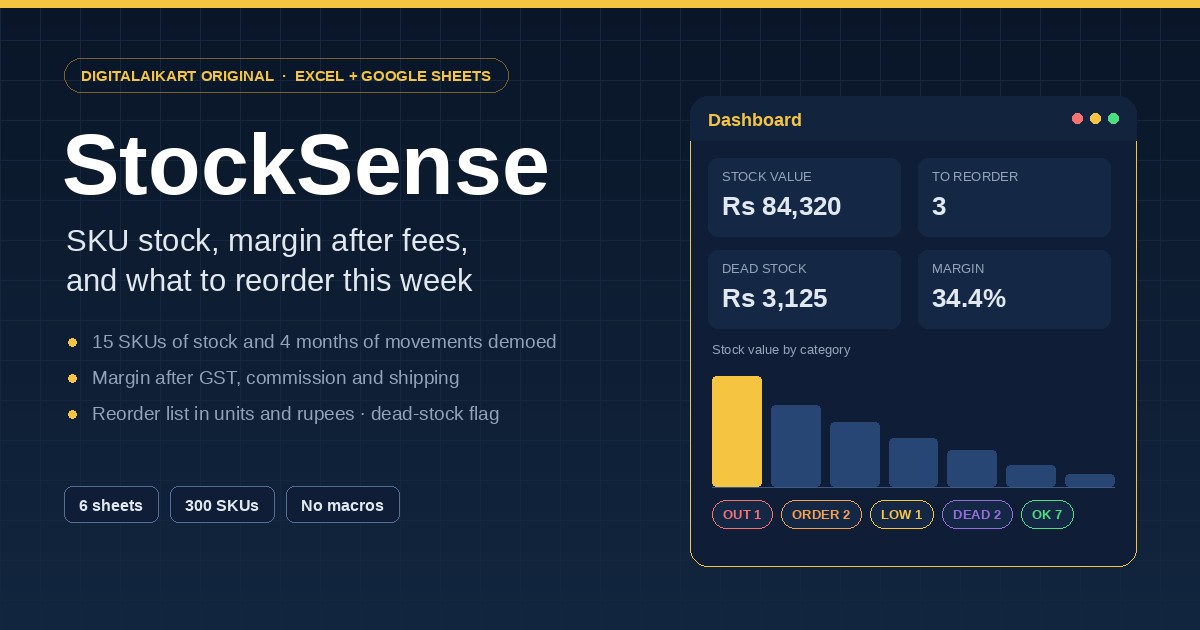
Thirteen live figures — stock value at cost, retail value, unrealised margin, SKUs to reorder, out of stock, units sold in 30 days, return rate, average margin, dead-stock value, cash needed for this week's reorder, and a negative-stock check that catches a data error — plus two charts, stock value by category and SKUs by status.

🔁 Return rate and write-offs tracked

Sales returns and damage are their own movement types, so the return rate on the Dashboard is real. On cash-on-delivery heavy channels this is the figure that quietly decides whether a 20% margin survives.

🧾 Dropdowns instead of typos

Category, channel, movement type, GST slab and SKU are all validated lists. A SKU that does not exist in Products cannot be logged in Movements, which is the single most common reason inventory sheets go wrong.

📖 A manual that documents the formulas

Every column, every status rule and every formula is written out in plain English and in full text in the guide — so you can extend the workbook, add rows or change the logic without hunting for help.

Why Not a Free Template or a Subscription App

Free templates stop at the list

A free inventory sheet usually gives you a table and a SUM. It rarely gives you days of cover from a moving 30-day window, margin after GST and commission, dead-stock ageing and a reorder quantity derived from lead time — because those need the movement log, the status rules and the settings to all point at each other. That is what this file is built to do.

Inventory apps cost every month

Subscription tools in India typically bill ₹500–₹2,000 a month once you add a channel or two. This is one payment of ₹199, it does not expire, and it keeps working with the internet switched off. It is a spreadsheet, so your data is a file you own and can open in ten years.

It is built for Indian selling, not translated for it

GST slabs in the price split, commission as a percentage you take from your settlement, RTO-heavy return tracking, Meesho and Flipkart in the channel list, and a margin model that starts from the ex-GST price because that is what is actually yours.

Inside the Pack

One ZIP, six files, nothing else to buy

  1. StockSense-Inventory-System.xlsx — the master workbook. Six tabs, all formulas in place, formatted for 300 SKUs and 5,000 movements, ready for your data.
  2. StockSense-EXAMPLE-FILLED.xlsx — the same workbook with 15 made-up SKUs and about four months of movements, so every column, status and chart can be seen working before you type anything.
  3. GUIDE.html — the full manual: a column-by-column reference, the exact formulas, the status rules, the weekly routine, GST and marketplace-fee notes, Google Sheets steps, extending the file, troubleshooting and questions. Opens offline in any browser.
  4. START-HERE.txt — the 60-second version, including the three rules that keep an inventory sheet honest.
  5. EXAMPLE-SKUS.csv — a starter product list in the same column order as the Products sheet, so you can paste your own catalogue in minutes.
  6. LICENSE.txt — one business, forever, editable; not resellable.

How It Works

From download to your first reorder list in about fifteen minutes

1 · Save it somewhere backed up

Put the workbook in Google Drive, OneDrive or iCloud — not the Downloads folder. A spreadsheet that lives on one laptop is one accident away from a lost catalogue.

2 · Look at the example first

Open StockSense-EXAMPLE-FILLED.xlsx and click through the six tabs. Two minutes of looking shows you what each column does and what "REORDER NOW" looks like in practice.

3 · Fill your SKUs

One row per SKU in the gold-header columns — every size and colour separately. Enter your opening count once, your reorder level and your supplier's lead time in days.

4 · Log movements, then read two tabs

Log sales and receipts on the Movements sheet as they happen. Then the whole system runs itself: the Dashboard for the four numbers that matter, the Reorder sheet for what to buy this week.

Preview

What each tab gives you

Dashboard

Thirteen calculated figures in two columns, a stock-value-by-category table and a stock-health table, with two charts beside them. Read stock value at cost, SKUs to reorder, dead-stock value and return rate first — if those four are fine, the business is fine.

Products

27 columns, 300 rows, frozen SKU and name columns and filter arrows on every header. Gold headers are yours to type; grey headers calculate. Status cells are colour-coded and margin turns red under 10%.

Movements

Date, SKU, movement type, quantity, channel, order number and note — 5,000 lines, with dropdowns for SKU, type and channel. Green for stock in, red for stock out, banded rows so a long log stays readable.

Reorder

A summary strip at the top — how many SKUs need ordering and the total rupee value — then one row per SKU with supplier, cover, suggested quantity, unit cost and a Priority flag of ORDER NOW, WATCH or CLEAR OR DISCOUNT.

Who It Is For

Anyone selling physical stock in India, on one channel or five

🛍️

Meesho, Amazon and Flipkart sellers

One catalogue, several panels. Keep one honest stock file instead of three panels that disagree, and see what each SKU earns after that channel's commission.

📱

Instagram and WhatsApp sellers

Orders in DMs, stock in your head. A five-minute daily log turns that into a reorder list and a dead-stock list, before the festive rush.

🏪

Shop plus online, same shelf

Set the marketplace fee to zero for counter sales and the same file covers both. The lead-time and dead-stock logic works the same on a shop floor.

📦

Small distributors and resellers

Hundreds of SKUs, thin margins, suppliers with long lead times. Days of cover and the reorder quantity are the two numbers that stop you buying the wrong thing.

File Format & Compatibility

Plain files, no lock-in, no macros

Format

One ZIP containing two .xlsx workbooks, the HTML guide, a plain-text quick start, a .csv starter list and the licence. Unzips on Windows, macOS, Linux, Android and iOS with no special software.

Where it opens

Microsoft Excel 2016 or later on Windows and macOS, Microsoft 365, Excel for the web, Google Sheets and LibreOffice Calc. Everything is written with plain SUMIFS, COUNTIF, IFERROR, LOOKUP and ROUNDUP — no macros, no add-ins, nothing to enable.

Google Sheets

Upload the .xlsx to Drive and open it with Sheets; the formulas and dropdowns convert. Charts sometimes lose their styling on import and can be re-inserted from Insert → Chart in seconds — the numbers behind them are intact.

Capacity

300 SKUs, 5,000 movement lines, 9 categories and 8 channels out of the box. Beyond that you copy the last formatted row down — the guide explains the Dashboard ranges too.

What it is not

It is not a billing or GST-filing tool, not a marketplace integration, and not a substitute for your accountant. It tracks stock, cost, margin and reorder quantities — nothing is uploaded and no account is connected.

Licence

One purchase, one business, forever

Your purchase covers one business for as long as you run it, on as many of your own devices as you like. Edit the workbook freely — add SKUs, sheets, formulas and colours. You may not resell, redistribute or publish the files, or hand them to another business. Full terms are in LICENSE.txt inside the pack.

Get Instant Access

One-time payment · Lifetime access · No subscription

Buy With Confidence

Your purchase is protected

⚡

Instant Delivery

Your download is ready the second your payment succeeds — one ZIP with both workbooks, the manual, the quick start, the starter list and the licence.

🔒

Private by Design

No account, no analytics, no upload. Your SKUs, costs and margins stay in a file on your own device — nothing is sent anywhere, and there is no server to breach.

💳

Secure Razorpay Checkout

UPI, cards, net banking & wallets — processed on PCI-DSS compliant infrastructure.

Frequently Asked Questions

Everything you need to know before buying

Is this an app or a spreadsheet?

A spreadsheet — one Excel workbook with six tabs. It opens in Microsoft Excel 2016 or later, in Google Sheets and in LibreOffice Calc. There is nothing to install, no account to create and no browser extension.

Does it connect to Amazon, Flipkart or Meesho?

No. Nothing is fetched automatically and no seller account is connected. You enter or paste your own numbers. That is deliberate: no API keys, no permissions to grant, no monthly fee, and no chance of a price or stock change being pushed to a live listing by a spreadsheet.

How is the margin calculated?

Selling price ÷ (1 + GST rate) gives the net price — the part of the price that is yours before tax is remitted. From that the workbook subtracts the marketplace commission percentage you enter, your shipping and packing cost per order, and your unit cost. The result is margin in rupees, and as a percentage of the net price. If you would rather model it differently, every formula is documented and editable.

Do I have to type my stock level every day?

No — and you should not. You enter opening stock once, then log movements: stock in, sales, sales returns and write-offs. Closing stock is calculated as opening + stock in − stock out. A physical recount becomes a write-off line with the note "recount", so the history stays honest.

How does it decide when to reorder?

From your own numbers. Days of cover is closing stock divided by average daily sales over the last 30 days. Status becomes REORDER NOW when stock falls to your reorder level, LOW when cover falls inside lead time plus a seven-day buffer, and DEAD when there is stock but no sale for 90 days. The suggested quantity covers lead time plus 14 safety days at the current pace — both thresholds are editable on the Settings tab.

How many SKUs does it hold?

300 SKUs and 5,000 movement lines out of the box. Beyond that you copy the last formatted row down and the formulas follow; the manual also explains which Dashboard ranges to widen. Most sellers with 20 to 150 live SKUs never touch the limit.

Does it file GST or create tax invoices?

No. It uses the GST rate to show you the net price and the true margin, and it tracks stock and cost. Tax invoices, GSTR-1 and GSTR-3B belong in your billing software or with your accountant.

What if I use Google Sheets, not Excel?

Upload the .xlsx to Google Drive, then open it with Google Sheets. The formulas, dropdowns and conditional formatting convert. Charts occasionally lose their styling on import — re-insert one from Insert → Chart and the numbers behind it are already there.

Can I use it for a shop as well as online?

Yes. Set the marketplace fee to 0 for counter sales, and the channel list already includes Offline / Shop. The reorder, cover and dead-stock logic does not care where the sale happened.

Is it a subscription?

No. One-time ₹199, no monthly or yearly fee, no free-plan limits, no expiry, and no feature held back for a higher tier.

How do I get my files after payment?

After a successful payment on Razorpay you are taken to a thank-you page with a download button. Click it and the ZIP is yours immediately. If the download does not start, email lonefaisal977@gmail.com and the files will be sent to you directly.

Can I get a refund?

Digital products are non-refundable once downloaded. But if a file arrives corrupted, will not open, or you were charged incorrectly, email lonefaisal977@gmail.com and it will be fixed or refunded.
Pairs Well With

If you are fixing the operations side, these fit alongside it

GST Invoice Generator Pro

The paperwork side: clean GST invoices and quotations with CGST/SGST or IGST worked out from the place of supply, printed to A4 or saved as PDF.

Udhaar Khata — Credit Ledger & Reminder App

For the wholesale or credit side of the same business: who owes you how much, ageing, statements and WhatsApp reminders.

BizCalc Pro — India Business Calculator Suite

Work out a landing cost, a break-even price or a GST-inclusive price before you set the selling price you enter here.

Sheets Autopilot — 12 Google Sheets Automations

If you run StockSense in Google Sheets, these scripts handle the repetitive parts of the same workflow.

Browse all Digitalaikart products →

Stop Guessing What Is On The Shelf

One-time ₹199 · Excel & Google Sheets · Manual, example file and licence included.

Get StockSense →