Sheets Autopilot — 12 Google Sheets automations
Digitalaikart Original · Automation Template Pack

Sheets Autopilot

12 Google Sheets automations that chase your invoices, send your receipts and follow up your leads — inside your own Google account

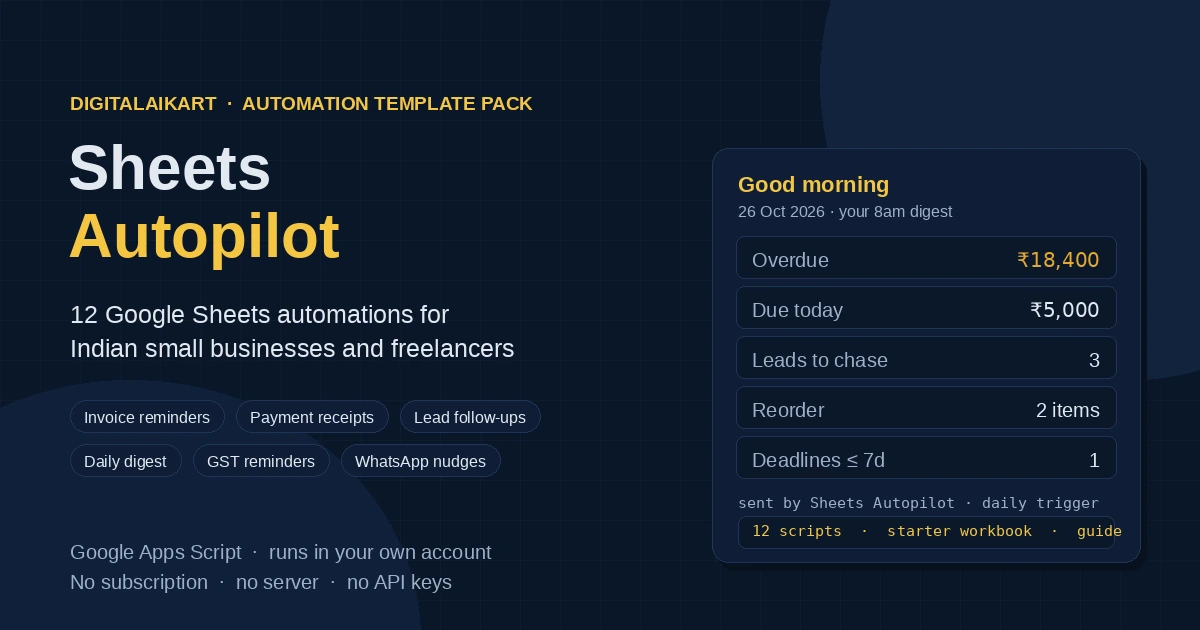
A small business in India runs on a spreadsheet: invoices, leads, stock, deadlines. The work that hurts is everything around it — remembering to chase a payment, writing the same receipt again, following up a lead three times, noticing a stock item ran out. Sheets Autopilot is twelve Google Apps Script automations that do that work on a trigger, in your own Google account, with no server, no subscription and no third-party login. Each script is one file you paste into Extensions > Apps Script, change your business name and email in a short block at the top, and switch on. You also get a starter workbook with the exact columns every script reads, an offline picker that copies the code for you, a setup guide with the real limits written down, and a 30-check test suite you can run yourself.

12
Automations
0
Subscriptions
30
Self-tests included
~4 min
Per automation to install
Get the Pack — ₹199 →

Who This Is For

Anyone in India whose business already lives in a Google Sheet

🧾

Freelancers & consultants

Stop scrolling through sent mail to find who has not paid. The reminder script does it daily, once per stage, and tells you what it sent.

🏪

Small shops & D2C sellers

Stock alerts at the reorder level, receipts the moment a payment lands, and one 8am email with the day's picture.

🎨

Agencies & studios

Lead follow-ups on day 3, 7 and 14, client onboarding folders, and a monthly report per client that you no longer write by hand.

🧑‍💻

Ops people & no-code builders

Commented, unminified Apps Script you can read and change — a starting point instead of a blank editor and a Stack Overflow tab.

What's Inside

Twelve automations, each one self-contained with its own CONFIG block

  1. 1 · Invoice Reminder Engine

    Emails a client 3 days before the due date, on the due date, then at 7, 15 and 30 days late — one email per stage, never a repeat. Writes the stage back to the sheet, and sends you a summary of what went out and what it was worth.

  2. 2 · Payment Receipt Sender

    Set an invoice's status to Paid and the client gets a receipt: receipt number, invoice number, amount, the amount written out in Indian words (lakh and crore style), paid-on date and mode.

  3. 3 · Lead Follow-Up Sequence

    An instant acknowledgement, then follow-ups on day 3, day 7 and day 14, each worded differently. Change the status to Won or Lost and it stops on the next run.

  4. 4 · Morning Business Digest

    One 8am email: overdue invoices and the total, invoices due today, leads to chase, items to reorder, deadlines in the next seven days. Empty days send nothing.

  5. 5 · Low-Stock Alert

    Works out live quantity (opening + in − out) and emails you at the reorder level with the shortfall and restock value — once per item per day.

  6. 6 · GST Filing Reminder

    Nudges 5 days, 1 day and on the day of the next GSTR-1 and GSTR-3B, with a seven-point checklist. Monthly, quarterly (QRMP) and composition modes.

  7. 7 · Deadlines → Calendar

    Pushes every live deadline into Google Calendar, updates the event when you move the date, removes it when the row is done. Event IDs are stored, so nothing duplicates.

  8. 8 · Weekly Drive Backup

    Every Sunday each tab is exported to its own CSV in a dated Drive folder, and the oldest folders are pruned so only the last eight remain.

  9. 9 · Duplicate Lead Cleanup

    Understands Indian phone formats — +91 98765-43210, 098765 43210 and 9876543210 all match — and lower-cased emails. Flags duplicates against the first record and deletes nothing.

  10. 10 · Client Onboarding Pack

    A new client row becomes a Drive folder, a filled copy of your template document and a welcome email with the folder link, then flips to Onboarded.

  11. 11 · Monthly Client Report

    On the 1st, each client gets last month's invoiced, paid and pending totals plus the jobs completed. You get one roll-up with every client.

  12. 12 · WhatsApp Nudge List

    A daily list of people who need a nudge, each with a wa.me link that opens WhatsApp with the message already typed. You press send.

Why It's Different

Built for how Indian small businesses actually invoice, chase and follow up

🇮🇳 India-first, not translated

Lakh and crore grouping in every amount, amounts written out in Indian words for receipts, Indian phone formats for duplicate matching and WhatsApp links, GST milestones rather than a generic calendar.

🔒 Runs in your own account

No server, no API keys, no third-party login, nothing to renew. Your data stays in your Sheet and Google's own services; the scripts only touch the file you attach them to.

🔁 Built not to double-send

Every script writes its state back to the sheet — reminder stage, receipt number, follow-up stage, last alert date, calendar event ID. Re-running is safe, which is the part most tutorial scripts get wrong.

🧪 Tested before it shipped

30 automated checks run against the scripts with the Google services stubbed: date maths, the money format, amount in words, duplicate grouping, CSV escaping, GST dates and link building. The suite is in the ZIP — run node tests/run-tests.js yourself.

📖 Limits written down

The guide states Google's real quotas (100 recipients a day on a personal account, 1,500 on Workspace), what breaks, and what each script deliberately does not do. No promises about WhatsApp automation that cannot be kept.

✂️ Twelve files, no framework

Paste only what you need. Each script stands alone with its own CONFIG and helpers, so nothing breaks if you never install the other eleven.

How It Works

From ZIP to a running automation in four steps

1 · Open the starter workbook

Upload Sheets-Autopilot-Starter.xlsx to Drive, open it with Google Sheets, save as a Google Sheet, and delete the example rows — they are all marked (example).

2 · Copy one script

Open picker.html in your browser, search for what you need, and press Copy code. It works offline and embeds all twelve scripts.

3 · Paste and edit the config

In the Sheet: Extensions > Apps Script. Paste over Code.gs, then change the business name, your email and the sheet name in the CONFIG block at the top.

4 · Install the trigger

Run the install…() function once, approve the permissions, then run the main function by hand to see it work. The trigger takes over from there.

Preview

What the files look like when you open the ZIP

picker.html

A dark, searchable card for each automation with Copy code and Download .gs buttons. Search "GST", "stock" or "WhatsApp" to jump straight to the file. Runs offline from the unzipped folder.

Sheets-Autopilot-Starter.xlsx

Six tabs — Start Here, Invoices, Leads, Stock, Deadlines, Clients — with the exact headers every script reads, frozen header rows, rupee and date formats, and two or three example rows per tab.

SETUP-GUIDE.html

The manual: the ten-minute setup, a card per automation with the columns it reads and the function to run, a testing section, the quota table, a troubleshooting table and what the pack does not do.

The daily digest email

A dark HTML email with five blocks and their totals — overdue, due today, leads, stock, deadlines. Shown in the cover image above.

A real reminder email

Short, polite and specific: invoice number, amount, due date, your UPI ID if you set one, and a line asking for the reference if they have already paid.

tests/run-tests.js

The suite that guards the logic. Plain Node, no dependencies — 30 checks, all passing on the copy you download.

File Format & Compatibility

Plain text scripts and standard Office files — nothing proprietary

Format

One ZIP containing 12 .gs files, the starter workbook (.xlsx), the offline picker (.html), the setup guide (.html), a README, a start-here file, the test suite (.js) and the licence.

What it runs on

Google Apps Script (the V8 runtime that every Google account gets by default) attached to Google Sheets, with Gmail, Drive, Calendar and Docs services. Setup needs a desktop browser; after that it runs on Google's servers, not your laptop.

Requirements

A Google account — a free @gmail.com works, Google Workspace gives higher sending limits. No install, no Node needed for the scripts (Node is only for the optional test suite), no API keys, no card.

Get Instant Access

One-time payment · Lifetime access · No subscription · Your own account

Buy With Confidence

Your purchase is protected

⚡

Instant Delivery

Your download is ready the second your payment succeeds — one ZIP with all twelve scripts, the workbook, the picker, the guide, the tests and the licence.

🔒

No Keys, No Access

The pack never asks for a password, an API key or account access. You paste the code into your own Google account and it stays there.

💳

Secure Razorpay Checkout

UPI, cards, net banking & wallets — processed on PCI-DSS compliant infrastructure.

Frequently Asked Questions

Everything you need to know before buying

Is this an ebook?

No. It is a working automation pack: 12 Google Apps Script files you paste into your own spreadsheet, a starter workbook with the right columns, an offline picker to copy the code, a setup guide and a licence. The guide explains the setup, but the product is the scripts.

Do I need to know how to code?

No. You copy a file, change your business name and email address in a small block at the top, and press Run once. Every script has the same shape and the guide walks through the first one step by step. If you want to change the wording of an email, that is plain text you can edit.

Do I need to pay for anything else?

No. Apps Script is included with a free Google account, and the scripts run inside your own account with no server, no third-party login and no API keys. Google's free quotas do apply — a personal Gmail account can email 100 recipients a day with 90 minutes of trigger runtime; Google Workspace is 1,500 recipients and 6 hours.

Does it really send WhatsApp messages?

Not automatically, and the pack says so plainly. Automated WhatsApp sending requires the official Business API with a Meta business account and per-message pricing. Instead the script emails you each morning a list of people who need a nudge, each with a wa.me link that opens WhatsApp with the message already typed — you press send.

Does the GST script file my returns?

No. It is a reminder calendar with a seven-point checklist that emails you 5 days, 1 day and on the day of the next GSTR-1 or GSTR-3B. Filing happens on the GST portal, statutory dates can change, and the email always tells you to confirm your own date on the portal.

Will it work with my existing spreadsheet?

Yes, if the column headers match. Each script reads a tab by name and by header text, and the guide lists every header each script needs. The starter workbook already has all of them, so the fastest path is to start there and paste your data in.

Is my client data uploaded anywhere?

No. The scripts run inside your own Google account and read only the spreadsheet you attach them to. There is no analytics, no call-back to us and no external server involved.

Can I use it for my clients' accounts?

Yes. The single-user licence covers your own business and client projects you deliver, including installing and configuring the scripts inside a client's own Google account on their behalf. You may not resell or redistribute the files themselves.

Is it a subscription?

No. One payment, lifetime access, no renewal and no per-seat fee.

How do I get the files after payment?

After a successful payment on Razorpay you land on a thank-you page with a download button for the ZIP. The ZIP contains everything and is yours to keep. If the download ever fails, email lonefaisal977@gmail.com and it will be sent to you.

Can I get a refund?

Digital products are non-refundable because they are instantly downloadable. But if you receive a defective or corrupted file, or were charged incorrectly, we will replace or resolve it — just email lonefaisal977@gmail.com within 7 days.
Pairs Well With

Build the rest of your back office with these Digitalaikart products

GST Invoice Generator Pro

Raise clean GST invoices offline, then let these scripts chase them and issue the receipts.

Freelancer Finance OS — India

The spreadsheet system for income, tax set-aside and runway; the digest script will mail you its numbers each morning.

Freelancer Contract & Proposal Kit

Proposal and contract templates to win the work, then the onboarding script to set the client up in a folder.

Browse all Digitalaikart products →

Put Your Sheet to Work

One-time ₹199 · 12 automations · starter workbook · offline picker · setup guide · 30 tests · instant download.

Get the Pack →

Get new tools & guides first

One short email whenever we publish something useful — new India-specific playbooks, tools and guides. No spam, unsubscribe anytime.