A digital wedding invitation you build yourself — three designs, a form instead of code
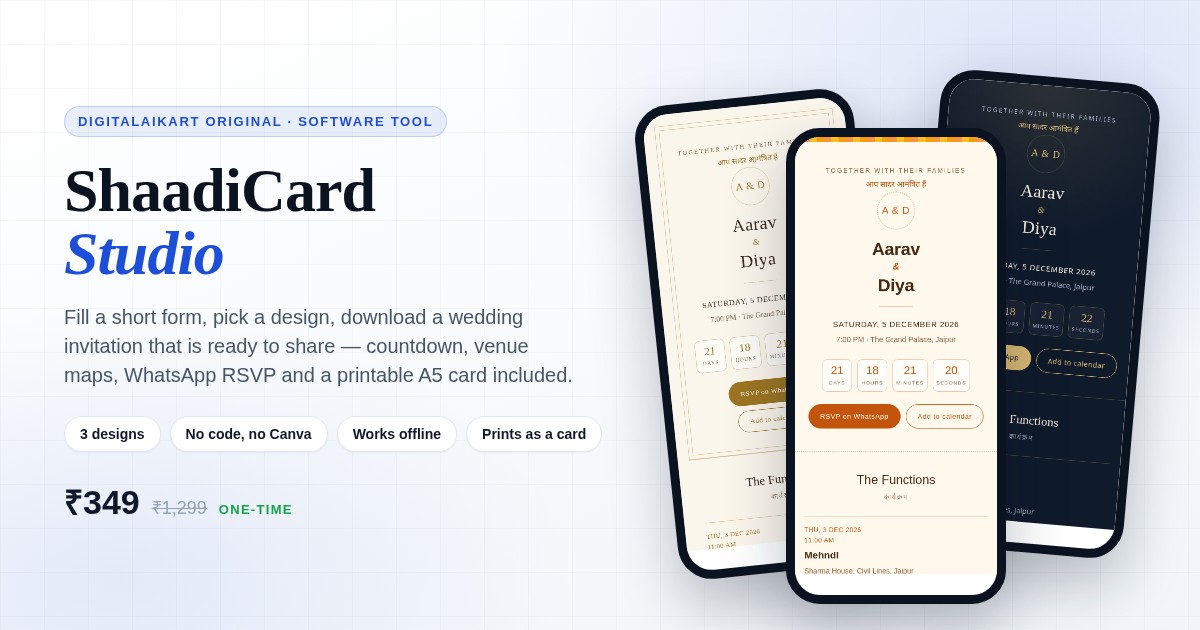
Open one file, fill a short form with the couple's names, the main date, the venue and every function, and pick one of three designs. The preview beside the form is the real invitation, not a mock-up. Press download and you have a single self-contained page with a live countdown, a function schedule where each venue opens in Google Maps, a WhatsApp RSVP button that writes the message for your guest, a calendar file that lands in Google or Apple Calendar, an optional photo gallery — and an A5 card that prints cleanly from the same file. No Canva plan, no subscription, no design service quoting you ₹3,000 to change a date, and nothing uploaded anywhere.
Get It for ₹349 →What usually goes wrong with a digital invite
Designers charge per revision, and Canva locks the good templates behind a monthly plan. A wedding has a hundred small changes — a time moves, a venue changes, a cousin is added to the sangeet. This is one payment and unlimited edits.
Half the messages after the invite goes out are "where exactly is it?" and "what time is the mehndi?". Every function in this invitation carries its own venue and a one-tap Maps link, and every guest can add all of it to their calendar in one click.
Guests forget, or reply to a different cousin. The RSVP button opens WhatsApp with the message already written and addressed to the number you chose, so confirmations arrive in one place, in one format.
A story disappears in 24 hours and a link sticker does not work for everyone. A hosted invitation page is a link you can put in a bio, a WhatsApp forward, a printed card's QR code or an email — and it still works next month.
Invitation builders want your photos on their servers. Here the studio never makes a network call: the invitation is built on your own laptop and you decide where it is hosted.
Screen designs usually waste a page when printed. The same file carries a print stylesheet that produces one A5 card with the essentials and none of the buttons — so one design covers the WhatsApp link and the card handed out at home.
Built for the person in the family who ends up making it
You want one link that has the dates, the venues, the map links and the RSVP in one place, without paying a designer for every change.
You have been handed the invitations because you are "good with computers". Fill a form, download, upload — done in an evening, no design skills needed.
A fast starting point for a client invite you will then customise in code — the CSS is readable and the design variables sit at the top of each theme.
Not just weddings: the same three designs work for a roka, a reception, a 25th anniversary or a griha pravesh. Leave the functions list empty for a single-day event.
Everything in the tool, without the marketing
Classic Gold — ivory paper, thin gold frame, serif names. Midnight Bloom — deep navy with warm gold, for an evening reception. Marigold — warm cream with a saffron band, for a daytime mehndi or haldi. Each is a full page, not a colour swap.
Names, host line, hashtag, main date and time, venue, a repeatable function list, a short story, photo links, WhatsApp number and a contact line. The live preview is the actual output, so there is nothing to guess.
Days, hours, minutes and seconds to the main day, calculated on the guest's own device. When the moment passes it switches to "The celebrations have begun" instead of showing negative numbers.
Mehndi, haldi, sangeet, wedding, reception — each with date, time and venue, plus an "Open in Maps" link that opens the venue search on the guest's phone.
The button opens WhatsApp with a ready message addressed to your number. Confirmations arrive in one chat, in one format, instead of across four family groups.
One click downloads a calendar file with a separate entry for the main day and every function — Google Calendar, Apple Calendar and Outlook all accept it.
Paste direct image links for two to six photos. Any image that fails to load is hidden automatically, so a broken link never shows a broken frame on your invitation.
The same file prints as a single A5 card — names, date, venue, functions and hashtag — with the countdown, buttons and gallery stripped out by the print stylesheet.
Your details stay in the browser, so you can close the tab and come back. Save the project as a small JSON file to continue on another computer.
Four steps, one evening
Unzip the folder and double-click shaadicard-studio.html. It opens in Chrome, Edge, Firefox or Safari. Nothing to install, no account, no internet needed.
Names, host line, date and time, venue. Add each function with + Add. Paste photo links if you have them, and your WhatsApp number for RSVP.
Switch between Classic Gold, Midnight Bloom and Marigold. Use the Phone / Tablet / Desktop buttons to see exactly what guests on each screen will get.
Press Download invitation. Rename the file, drag it into Netlify Drop or your host, and share the link on WhatsApp. Print the same file as an A5 card when you need paper.
What the finished invitation looks like
The right-hand panel is not a picture of the design — it is the actual file you will download, rendered live in the browser. If it looks right there, it is right.
Names at the top, countdown next, then functions, story, photos and RSVP. Type scales with the screen, and the gallery drops from three columns to two on a small phone.
These are typographic invitation designs built from system fonts — not hand-painted artwork with illustrations. What you get is a clean, readable invitation that looks deliberate on every device and prints properly, not a decorative poster.
One ZIP, seven files, nothing to activate
The maker: form, three designs, live preview, export, project save and open. HTML, CSS and JavaScript in a single file that works offline.
A finished invitation using clearly labelled example data, so you can see the output — countdown, functions, maps, RSVP — before you type anything.
The five-minute walkthrough, free hosting options, how photos work, how to change the invite after sharing, and a troubleshooting list.
A one-page checklist: what to check before downloading, the exact print settings for an A5 card, QR code tips and what to do after the wedding.
The three designs side by side, so the family can pick one without opening the tool first.
Plain-English terms: unlimited invitations for your own and your family's events, no reselling the tool, no claiming the designs.
What you need to run it
A ZIP containing one self-contained HTML file for the studio, one example invitation, two guides, a PNG preview and the licence. Unzips on Windows, macOS, Linux and Android.
Current Chrome, Edge, Firefox and Safari on a laptop or desktop. No Office, no Canva, no Adobe, no account, no internet connection required.
A standalone .html invitation that works on any phone or host, a .ics calendar file generated for guests, an A5 print card from the browser's print dialog, and a .json project file for backup.
The studio has no server, no analytics and no network calls. Your details stay in your browser's own storage, and the invitation you download carries no tracking of any kind.
Plain English, no small print games
Make unlimited invitations for your own wedding and for your family's and friends' functions, edit the downloaded invitation however you like, host it anywhere, and print it as a card.
Resell or redistribute the studio files, upload them to a template marketplace or course, or sell invitations you make with it as a design service without a separate commercial licence.
One-time payment · Lifetime access · No subscription
What happens after you pay
Your download is ready the moment your payment succeeds — the ZIP with the studio, the example invitation, both guides and your licence.
Nothing is uploaded. The studio makes no network calls at all, and the invitation you create carries no tracking, no analytics and no third-party scripts.
UPI, cards, net banking and wallets — processed on PCI-DSS compliant infrastructure. You never share card details with us.
Everything you need to know before buying
A tool that produces the template. You open one HTML file, fill a form with your names, dates and venues, choose one of three designs, and press Download. What you get is a finished, self-contained invitation page you can host anywhere or print as a card. You never edit code unless you want to.
No. Nothing is locked behind a Canva plan and there is no monthly fee. The designs, fonts and layout ship inside the file, and the fonts are ones already installed on the guest's device — so an invitation never asks a guest to install anything or load a web font.
The invitation you download is mobile-first and works on any phone. The maker itself is a desktop tool — editing on a laptop or desktop is much easier because the form and the live preview sit side by side. Make it once on a laptop and share the finished file with everyone.
The RSVP button opens WhatsApp with a message already written and addressed to the number you entered, so replies land in your WhatsApp. There is no form, no server and no third-party RSVP service to sign up for. You can also print the number on the card.
Anywhere that serves a static file. Drag the file into Netlify Drop for a free link in seconds, upload it to GitHub Pages, or put it on your existing domain. You can also send the file directly on WhatsApp or email, though a hosted link gives clickable RSVP buttons and a proper preview.
Yes. Open the studio, change the details, download again and upload the new file to the same place. The link stays the same, so nothing you have already shared breaks.
As many as your family needs — one per function, one per cousin, one per year. The licence covers your own and your family's events. Reselling the tool, or selling invitation design as a service, needs a separate commercial licence.
The countdown runs on each guest's own device clock and counts to the exact date and time you typed. Enter the time in Indian Standard Time for guests in India; if you have guests abroad, add the time zone to the venue line so nobody has to guess.
Yes. The file carries a print stylesheet that lays out a single A5 card — names, date, venue, function list and hashtag — with the countdown, buttons and gallery removed automatically. Print with background graphics turned on, or hand the PDF to a printer.
The studio file, a finished example invitation so you can see the output before you start, a start-here guide, a printing and sharing checklist, a PNG preview of the three designs and your licence. Nothing to install, nothing to activate.
After a successful payment on Razorpay you are taken to a thank-you page with a download button. Click it to get your ZIP instantly — it is yours to keep.
Digital products are non-refundable because they are instantly downloadable. But if you receive a defective or corrupted file, or were charged incorrectly, we will replace or resolve it — just email lonefaisal977@gmail.com within 7 days.
The rest of the wedding, once the invitation is out
Wedding budget, vendor and payment tracker in Excel and Google Sheets — every advance, every balance, in one place.
The cost side of the same season: what each function really costs, and where the money quietly leaks.
Copy-paste prompts for vendor negotiations, guest communication and the run sheet — useful if you are planning someone else's wedding.
One-time ₹349 · Offline tool · 3 designs, example invite, two guides & licence included.
Get ShaadiCard Studio →