The Indian wedding budget, vendor and payment tracker — planned, committed and paid, kept apart
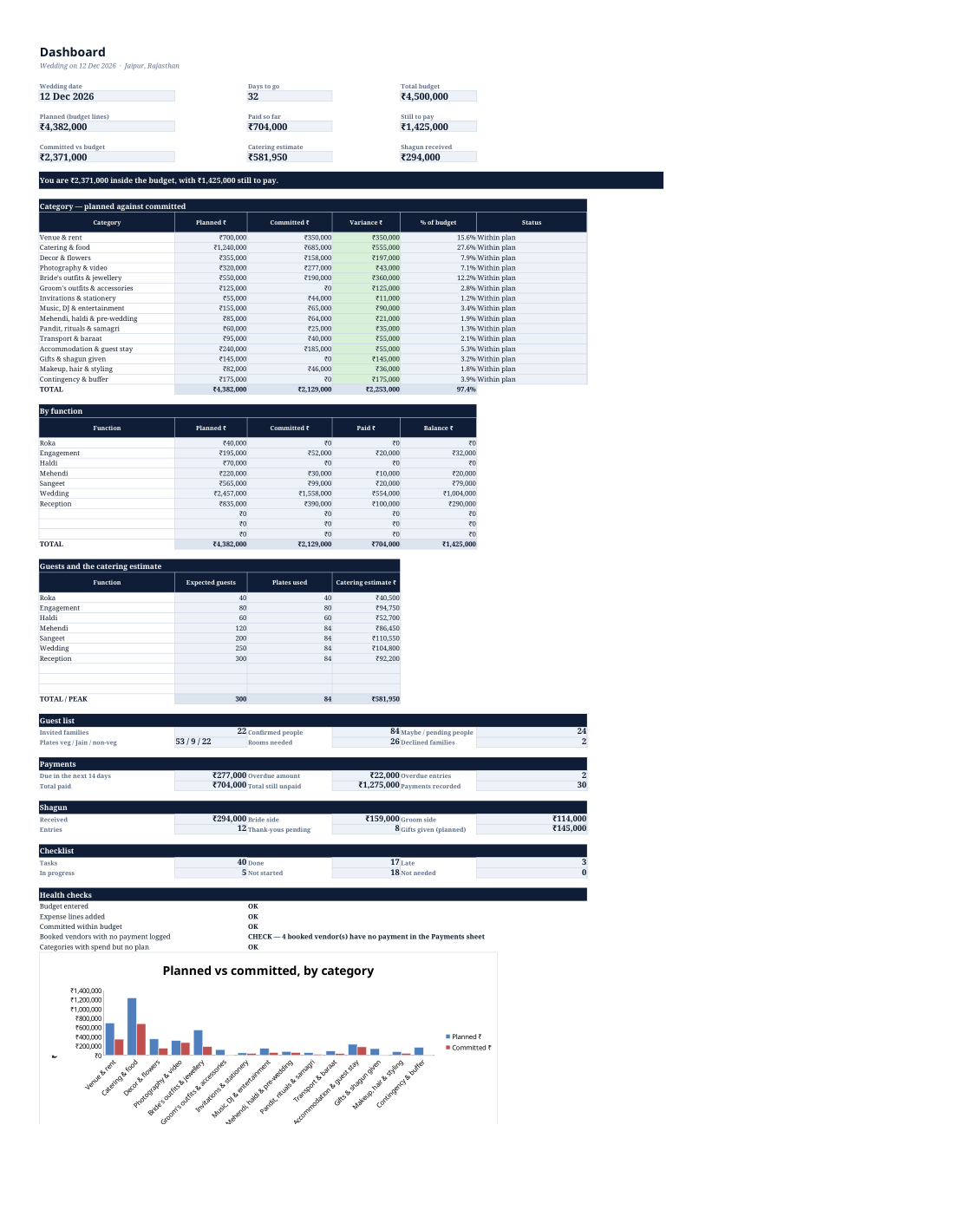
One Excel workbook, nine linked sheets, no macros and nothing to install. You plan the wedding by function and by category, log every vendor you speak to with their quote and GST, record every advance and instalment against its due date, count plates from your guest list, keep a shagun register and work a checklist whose dates are calculated backwards from the wedding day. The Dashboard adds it up: what you planned, what you have committed, what has actually been paid, what is still owed, what is due in the next fortnight and what is already late — plus six health checks that tell you when a number is missing instead of quietly showing zero. It runs in Microsoft Excel and in Google Sheets, on a laptop or in the phone app, and it is one payment with no subscription. Every formula is a plain SUMIFS, COUNTIFS or EDATE, so you can open it, read it, change it and keep it.
Get ShaadiBudget Pro — ₹249 →A wedding is forty vendors, six functions, three opinions and one number everybody is quietly guessing at
A notebook for the caterer, a WhatsApp forward for the decorator, a diary for the venue, one Excel sheet someone's cousin started, and a number in everybody's head. Nobody can answer "how much have we spent" without an hour of phone calls.
The caterer quotes ₹1,150 a plate, then adds GST. The decorator's quote excludes lighting. The photographer's travel is "extra". By the time you compare two vendors you are comparing two different sums, and the cheaper one is not always cheaper.
Forty thousand by UPI in April, fifty thousand by cheque in July, and nobody remembers which instalment that was. The vendor calls in November for a balance you thought was settled in September.
250 invited, 180 "definitely coming", 60 maybe, and a caterer who needs a number nine days before the function. Then the Jain and non-veg counts get worked out on the back of an envelope, at the counter, on the day.
Three numbers kept apart on purpose: planned, committed and paid
Planned is what the Budget Plan sheet says you intend to spend. Committed is what a vendor has actually quoted and you have booked. Paid is what has left your bank. The Dashboard shows all three, plus what is still owed — so an "on budget" wedding that is short of cash this month is visible before it happens.
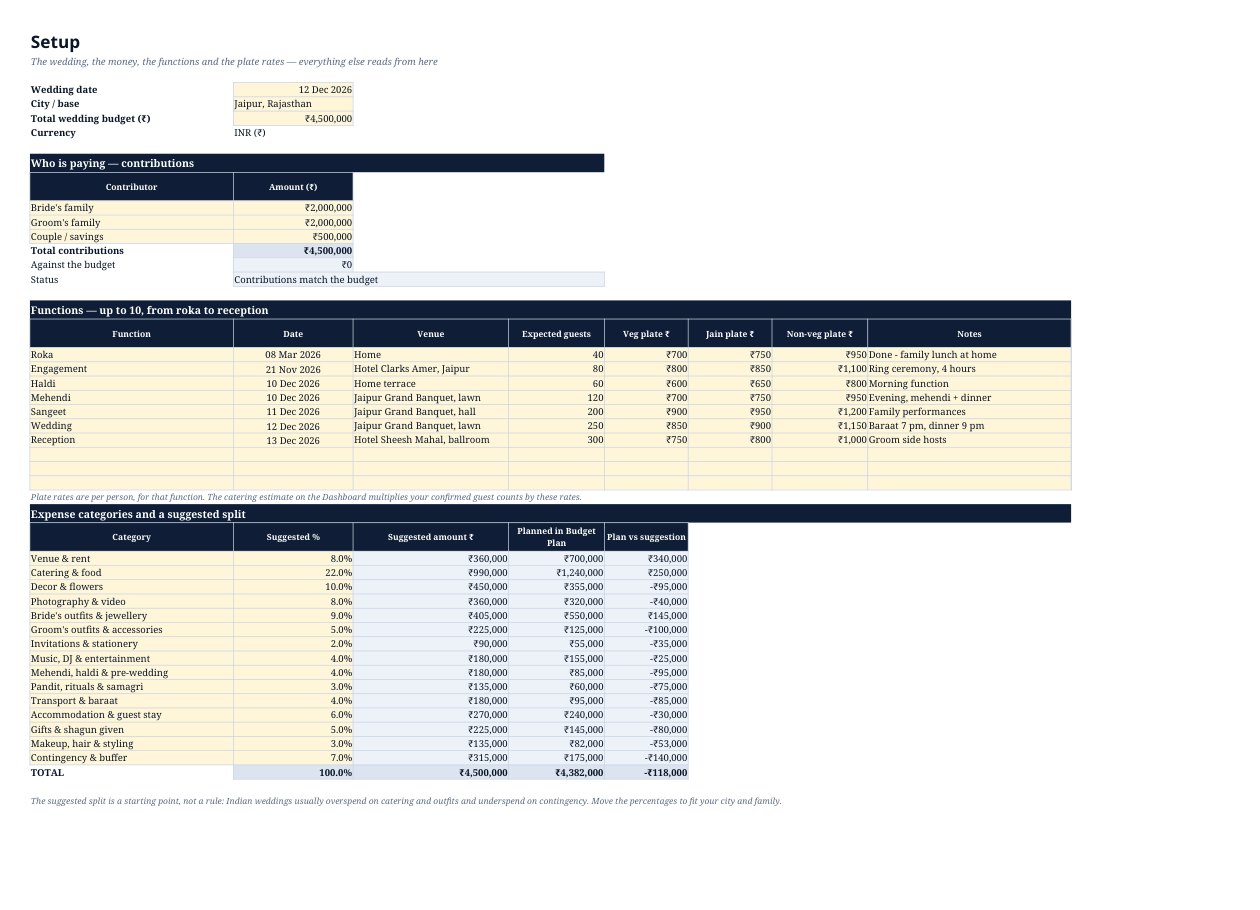
Roka, engagement, haldi, mehendi, sangeet, wedding, reception — up to ten functions, each with its own date, venue, expected guests and plate rates. Every expense line and every vendor sits against a function, so the Dashboard shows what each function actually costs.
Type the quote, the GST percentage and any other charges; the workbook shows the tax-inclusive quote and the true total cost beside it. Two vendors quoted differently finally become two comparable numbers, and the booked amount is what feeds every total.
One row per advance or balance, with the mode and a reference. Mark Paid = Yes when the money goes out. Unpaid rows past their date turn red, rows due within fourteen days turn amber, and "paid so far" per vendor is calculated from that flag alone — not typed twice.
One row per family with veg, Jain and non-veg headcounts. The Dashboard takes the smaller of the function's expected guests and the confirmed people, splits it in your confirmed guest mix, and prices it at that function's plate rates. You are not catering for 250 when 84 have confirmed.
Who gave what, on which function, cash or UPI, and whether the thank-you went out. Totals split by bride side and groom side, so the "who gave what" conversation has a number behind it instead of a memory.
Forty tasks with "months before" — book the venue at nine months, print the cards at four, confirm the rooming list at one. The do-by date is calculated from the wedding date on Setup, so changing the date moves every task with it, and anything past its date and not done is flagged LATE.
The Dashboard tells you when the budget is empty, when a vendor is booked in a category with nothing planned, when a function has guests but no plate rate, and when a booked vendor has no payment logged. A spreadsheet that says "check this" is worth more than one that says ₹0.
Planned against committed, category by category, on the Dashboard. It prints with everything else on one A4 page for the meeting where the budget gets decided.
Five files, one ZIP — the blank workbook, a filled example, the guide, a quick start and the licence
The blank workbook, ready for your wedding. Nine visible sheets plus a hidden list sheet that feeds the dropdowns. 160 budget lines, 70 vendors, 160 payments, 220 guest families, 120 shagun entries, 80 checklist rows, 10 functions.
The same workbook filled with a complete fictional wedding — Meera and Aarav, Jaipur, 12 December 2026, ₹45 lakh, 40 tasks, 18 vendors, 30 payments, 22 guest families. Every name and amount is invented; it exists so you can see what "finished" looks like before you type anything.
Sheet by sheet, the rules the workbook follows, the exact catering arithmetic, Excel and Google Sheets steps, printing, sharing, seven common "is this a bug?" cases with fixes, and the India notes on GST, TDS and the cash limit.
The two-minute version: what to fill first, in what order, and the three habits that keep the totals correct.
One wedding, unlimited edits, unlimited family members on the shared sheet, unlimited printing. No resale, no republishing, no running other people's weddings on one copy.
Real screenshots of the worked example — nothing staged
One workbook, two ecosystems, no macros and no password
| Item | Format | Opens in |
|---|---|---|
| The template and the example | .xlsx (Office Open XML), formulas only — no macros, no add-ins, no protected sheets | Microsoft Excel 2016 and later, Microsoft 365, Google Sheets, LibreOffice Calc |
| Google Sheets | Upload the .xlsx to Drive, then File → Save as Google Sheets | Every formula is SUM, SUMIF, SUMIFS, COUNTIF, COUNTIFS, SUMPRODUCT, MIN, MAX, ROUND, EDATE or TEXT — all present in Sheets under the same names |
| Phone | The Google Sheets app, or the Excel app | Every sheet is editable; the layout stacks and the tables scroll sideways |
| Printing | A4, portrait for the Dashboard and Checklist, landscape for the long tables, each sheet already set to fit to width | Any printer, or File → Download → PDF in Google Sheets |
| The guide | PDF, five pages, A4 | Any PDF reader |
| Apple Numbers | Numbers can open .xlsx files | Most formulas survive; the chart and some number formats may not. We have not tested Numbers, so treat Excel, Google Sheets or LibreOffice as the supported route |
Internet is needed once, to download the ZIP. After that the file is yours — nothing is uploaded, there is no account, and no one can see your vendors or your guest list.
Six steps, about fifteen minutes to a working budget
Type in the pale gold cells; the blue-grey cells are formulas. Use the dropdown values for category, function, side and status — free text is allowed, but a near-match will not be added to the right total.
Written for the person who ends up holding the spreadsheet
You have a number, a date and a hundred decisions. This keeps every quote and every payment in one place so the number stops moving without you knowing.
Contribution lines on Setup, a bride-side and groom-side split in the shagun register, and a committed-versus-budget figure that both sides can read off the same page.
You are the coordinator, you have forty tabs open, and you need one screen you can send to a relative who asks "kitna kharcha hua". That is the Dashboard.
Useful as a per-wedding cost sheet — one file per wedding, as the licence asks. Not a booking system, not a CRM, and it does not pretend to be one.
One-time payment · Lifetime access · No subscription, no per-wedding fee, no expiry
The same terms as every Digitalaikart tool
Razorpay handles the payment. Card and UPI details are never seen by this site.
The ZIP is on the thank-you page the moment the payment succeeds, and the link is yours to keep.
If a file is missing or will not open, email within 7 days and a working copy is sent.
One wedding, unlimited edits and printing, everyone in the family on the same sheet. LICENSE.txt is inside the ZIP, not buried on a web page.
No. You get two working spreadsheets — a blank one and a filled example — plus a guide, a quick start and a licence. Nothing to read before you can use it: open the workbook and start typing.
Both work, and so does LibreOffice Calc. In Google Sheets, upload the file to Drive and use File → Save as Google Sheets. Every formula in the workbook exists in Sheets with the same name, so nothing needs rewriting. There are no macros, so nothing gets blocked either.
Planned is your intention, from the Budget Plan sheet. Committed is what a vendor has quoted and you have booked, from the Vendors sheet. Paid is money that has actually left, from the Payments sheet where Paid = Yes. The Dashboard shows all three and the gaps between them, which is how you see an overspend before the bill arrives.
It multiplies the quote by whatever GST percentage you type, and adds any other charges, so you can compare two vendors on the same basis. It does not know the correct rate for a given service, and it does not calculate your GST liability or file anything — that is between you, the vendor and your CA.
For each function it takes the expected guests from Setup and the confirmed people from the Guests sheet and uses the smaller of the two. It splits those plates in your confirmed veg / Jain / non-veg mix and prices them at that function's plate rates. It is a sanity check against a caterer's quotation, not a replacement for it.
Yes. In Google Sheets, share the file with them as Editors — the licence covers everyone working on the same wedding. On a phone, the Google Sheets app can edit any cell, so a payment status can be updated at the vendor's counter.
Ten functions, 160 budget lines, 70 vendors, 160 payments, 220 guest families, 120 shagun entries and 80 checklist rows. That covers a large Indian wedding comfortably; if you genuinely need more rows, insert them above the total row and the formulas follow.
No. It is a planning aid. TDS under sections 194C and 194J, the ₹2 lakh cash-receipt restriction under 269ST, and anything you need to file are yours to confirm with a chartered accountant. The guide explains where each of these shows up in a wedding budget.
No, and be careful of anything that claims to. Costs depend on your city, the season, the guest count and the menu. Every amount in the worked example is fictional and labelled as such. What the workbook does is hold the numbers you bring back from real quotations.
The licence covers one wedding, with unlimited edits and printing. If you are a planner running several weddings, buy one copy per wedding you run — that keeps the terms simple and the file honest.
Page 4 of the guide lists the seven things that usually look like a bug — a category typed instead of picked, a vendor name spelled two ways, a date typed as text — with the fix for each. If it is genuinely broken, email within 7 days and a working copy or a fix comes back.
After a successful payment you land on a thank-you page with a download button for the ZIP. The ZIP holds both workbooks, the guide, the quick start and the licence.
Digital products are non-refundable once downloaded. If a file is missing, corrupted or will not open, email lonefaisal977@gmail.com within 7 days and it will be replaced.
If the wedding is being paid for out of a business, see which month the vendor instalments collide with salaries. ₹249.
Work out what a wedding loan actually costs per month before you sign for one. ₹199.
Save-the-date and function cards, made offline in your browser. ₹249.