DutyRota — a printed monthly staff roster with shift codes, days off and a coverage line under each day
Digitalaikart Original · Offline Roster Tool

DutyRota

A month of staff shifts in one click — printed on a single A4 page

DutyRota is a roster planner for a small shift-based business: a sweets shop, a cafe or cloud kitchen, a clinic, a salon, a security agency, a small factory. You list your people, your shifts and how many of each shift you need each day, and it fills the month. It places each person's weekly off first, honours approved leave and holidays, stops anyone working more than the number of days in a row you allow, keeps everyone inside their weekly shift cap, and then shares the shift types out so the same two people are not always on nights. A coverage line under every day tells you the moment a shift is short. One press prints the whole month on A4 landscape with a sign-off line, one press copies a WhatsApp message for the staff group, and the CSV opens in Excel or Google Sheets. It is a single HTML file that runs in your browser — no install, no account, no per-seat monthly fee, and your team's names never leave your computer.

31
Days in one go
1
A4 page to print
₹0
Per month
Offline
Runs from your PC
Get DutyRota — ₹199 →

The Problem It Solves

The roster lives in a notebook, a WhatsApp group and one person's memory — until someone does not turn up

📓

The same three people always get Sunday off

Whoever writes the roster by hand falls into a pattern. The favourites get the good days, the newest hire gets every closing shift, and the resentment arrives long before the resignation does.

📵

Leave is approved in one place, forgotten in another

The leave is in a diary, the roster is in Excel, and the holiday list is in someone's head. The clash is discovered on the morning it happens, at the counter, with a queue.

🧮

Nobody knows the hours until the salary is due

Twenty-six days, six hours a day, minus one break — worked out on a calculator at month end, differently each time. The argument is never about the roster, it is about the money.

💸

Software wants a monthly fee per employee

Rostering tools in India are priced per user per month — commonly ₹99 to ₹499 a head. For eight staff that is ₹800 to ₹4,000 every month, for a grid you fill once a week.

What DutyRota Does

One file, one month, one page — and the rules are applied in a fixed, explainable order

⚡ Generate a month in one click

Thirty-one days, every person, every shift. The generator applies your rules in order: pinned cells, then leave and holidays, then weekly offs, then the consecutive-day limit, then the weekly cap, then fair distribution.

🗓️ Weekly off is never forgotten

Give each person a fixed weekly-off weekday and that day stays free every week of the month, including the weeks that start mid-month.

🏖️ Leave and holidays come first

Enter a leave range for one person, or a holiday date for the whole business. The generator works around both instead of overwriting them.

⚖️ Fair rotation, not favouritism

Shift types are handed out by how often each person has already had them, so morning, evening and full-day shifts spread across the team instead of settling on the same names.

🛡️ Limits you set are enforced

Maximum days in a row and a weekly shift cap per person. The generator will give someone an extra day off rather than break either limit.

🔍 Coverage check under every day

Each shift shows how many people you rostered against how many it needs — 2/2 in green, 1/2 in red — for all 31 days at once, plus a per-shift total for the month.

🖨️ Prints on one A4 page

Business name, month, legend, the full grid, the coverage line and a sign-off block for the manager and the owner. Landscape, 100% scale, no shrinking.

💬 A WhatsApp message in one press

Each day on one line: shift code, who is on it, who is off. Copy it into the staff group instead of typing it out at midnight.

📊 Hours and a CSV

Days worked, hours scheduled, off days and leave days per person, and a CSV with one row per person per day for your attendance sheet or payroll.

🔒 Offline, and yours

No account, no upload, no analytics. Backup downloads the whole plan as one JSON file; Restore loads it on another computer.

A Look at the Roster

This is the printout — shift codes in the grid, a coverage line under each day, space to sign at the bottom

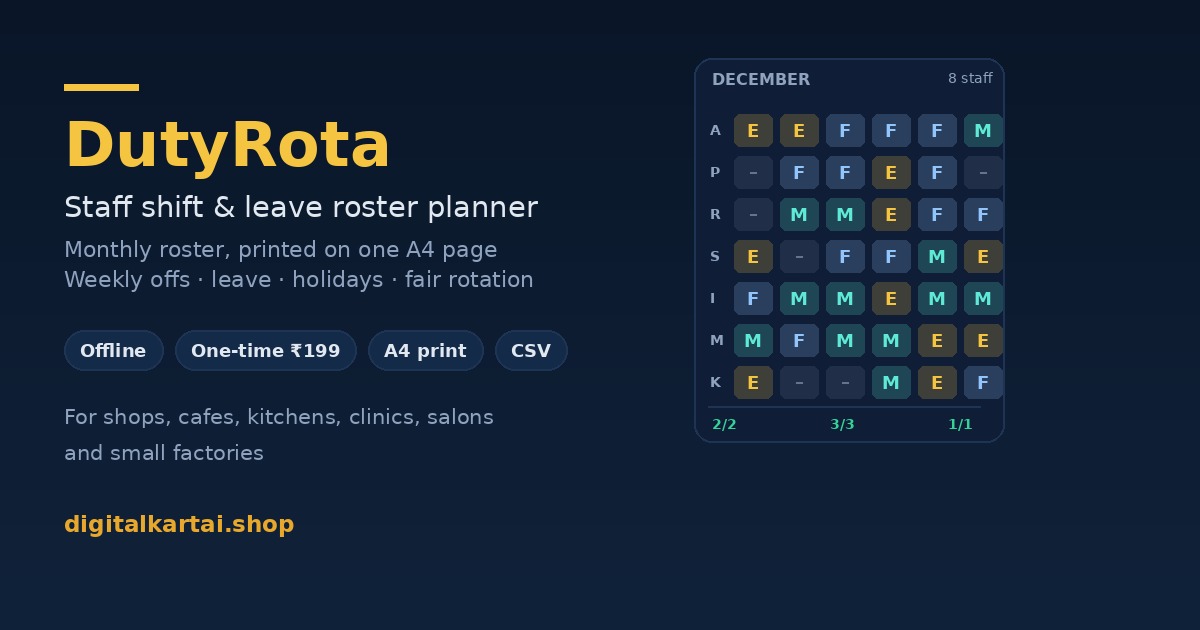
Sample Sweets & Cafe December 2026 · 6 of 8 staff shown · printed on one A4 landscape page Morning 08:00–14:00 Evening 14:00–20:00 Full day 10:00–19:00 Off Leave Staff 1 M 2 T 3 W 4 T 5 F 6 S 7 S 8 M 9 T 10 W 11 T 12 F 13 S 14 S Anil Kumar Counter M – F E E M M – F E E M M – Priya Sharma Counter M M – F E E M M – F E E M M Ravi Verma Kitchen E M M – F E E M M – F E E M Sunita Devi Kitchen E E M M – F E E L L – F E E Imran Sheikh Kitchen F E E M M – F E E M M – F E Deepak Yadav Delivery – F E E M M – F E E M M – F M needs 2/2 2/2 2/2 2/2 2/2 2/2 2/2 2/2 2/2 2/2 2/2 2/2 2/2 2/2 E needs 2/2 2/2 2/2 2/2 2/2 2/2 2/2 2/2 2/2 2/2 2/2 2/2 2/2 2/2 Prepared by __________________ Manager Owner
Fourteen of thirty-one days shown, from the example file included in the download.

What each cell means

M, E, F are your shift codes — the ones you type in the Shifts panel, so they can be Morning, Evening, Night, General or anything else, one or two letters.

— is a day off: a weekly off, an extra off day because there were more people than slots, or a rest day after the consecutive-day limit.

L is approved leave and H is a paid holiday. On a closed holiday the whole row reads H and nobody is rostered.

Under the grid, 2/2 means two people rostered against two needed. A red 1/2 is a shift that is short — visible before it happens, not after.

RuleWhere you set it
Weekly off weekdayStaff card
Max shifts per weekStaff card
Max days in a rowBusiness panel
People needed per shiftShift card
Weekend headcountShift card
Leave and holidaysLeave & holidays panel

How It Works

From unzip to a roster on the wall in about ten minutes

  1. Unzip and open. Double-click index.html. It opens in your browser and loads a worked example so you can see a full month before you change anything.
  2. Describe your team. Name, role, weekly-off weekday, maximum shifts per week, and optionally the shift they prefer. Eight staff takes about three minutes.
  3. Describe your shifts. Name, one or two letter code, start and end time, break minutes, and how many people the shift needs on a normal day and at the weekend.
  4. Add leave and holidays. A date range per person, and the dates the business is closed. Both are respected the next time you generate.
  5. Generate, adjust, print. Press Generate roster. Click any cell you want to change — the change is pinned. Print, or copy the WhatsApp text.

Who It Is For

Any business where the same work has to be covered by a changing set of people

🍬

Sweet shops, kirana and retail counters

Opening and closing shifts, a rush on weekends and festivals, and staff who need one fixed day off a week.

☕

Cafes, cloud kitchens and small restaurants

Morning prep, evening service and one full-day person, with more hands on Saturday and Sunday.

🩺

Clinics, diagnostic labs and pharmacies

Reception, technician and pharmacy shifts, with leave planned weeks ahead instead of discovered on the day.

💇

Salons, spas and studios

Small teams where one person's day off changes the whole week's bookings — and where fairness matters more than in a factory.

🛡️

Security and facility agencies

Day and night posts at one site, with a consecutive-day limit that stops the same guard taking every night.

🏭

Small factories and workshops

Two or three shifts across a small permanent team, with a weekly cap that keeps the roster inside your hours policy.

What Is Included

One ZIP, six files, nothing to install

index.html — the whole app

The roster planner in one self-contained file. Open it, use it, keep it on the shop computer. No dependencies, no CDN, no internet.

README.md — the manual

Every field explained, the order the generator applies rules in, printing settings, the WhatsApp and CSV exports, backup and restore, and a troubleshooting section.

START-HERE.txt — one page

The thirty-second version: what to set first, how to generate, how to print, where your data lives.

example-roster.json — a worked month

A complete December roster for an eight-person sweets shop. Load it with Restore to see how a finished month looks, then edit it into your own team.

sample-roster-print.pdf — the printout

Exactly what the A4 landscape page looks like, so you know what you are getting before you print your own.

LICENSE.txt — plain terms

One buyer, one business, all its branches, unlimited staff and unlimited printing. No resale, no hosting it for other people.

File Format & Compatibility

Nothing exotic: a web page, a CSV, a JSON backup and a PDF

ItemFormatOpens in
The appSingle HTML file (HTML, CSS and JavaScript inlined)Chrome, Edge, Firefox, Safari 15+, on Windows, macOS, Linux, Android and iOS
Roster for printingA4 landscape, printed from the browser or saved as PDFAny printer, or the browser's own "Save as PDF"
Data exportCSV, one row per person per dayExcel, Google Sheets, LibreOffice, Tally import templates, any attendance sheet
Backup and restoreJSON, one file for the whole planThe app itself, on any computer
Example printoutPDF, one pageAny PDF reader

Internet is needed once, to download the ZIP. After that, nothing. No installation, no admin rights, no account, no monthly check-in.

Get Instant Access

One-time payment · Lifetime access · No subscription, no per-employee pricing, no expiry

Buy With Confidence

The same terms as every Digitalaikart tool

🔐

Secure payment

Razorpay handles the payment. Card and UPI details are never seen by this site.

⬇️

Instant download

The ZIP is on the thank-you page the moment the payment succeeds, and the link is yours to keep.

🔁

Replaced free

If a file is missing or will not open, email within 7 days and a working copy is sent.

Frequently Asked Questions

Is this an ebook?

No. You get a working application — one HTML file you open in your browser — plus a manual, a worked example, a sample printout and a licence. There is nothing to read before you can use it.

Do I need internet, an account or an install?

No. The app is one file on your computer. No sign-up, no login, no server, no analytics, and it works with the internet switched off. Your staff names and shifts never leave your device.

How many staff and shifts can it handle?

There is no built-in limit. The grid is comfortable to about 25 staff and 6 shifts, which prints on one A4 landscape page. Past that the page still prints but the type gets small. Most small businesses sit far inside that range.

Does it record attendance or calculate salary?

No. DutyRota plans the roster. It does not record who turned up, mark late or absent, or calculate wages, overtime, PF or ESI. It shows scheduled hours per person and exports a CSV so your attendance sheet or payroll tool can use the plan.

Will the roster be legally compliant?

The app applies the rules you set — a weekly off, a maximum number of consecutive days and a weekly shift cap. Whether those numbers satisfy your state's Shops and Establishments Act, the Factories Act or a contract is for you to confirm. It is a planning aid, not legal advice, and it does not know your state's limits.

Can I use it for more than one shop or branch?

Yes. The licence covers one business including all its own outlets and departments. Keep one backup file per branch, or put the branch in the role field so you can see who belongs where.

Does it work on a phone?

Yes. The layout stacks and the roster scrolls sideways in mobile Chrome, Safari and Firefox, so you can change a cell while standing in the shop. Printing from a phone needs a printer app; most people print from a computer.

What happens when a shift cannot be covered?

The Coverage check shows the shortfall per shift and the Checks panel names the days, instead of quietly leaving a gap. You then lower the headcount for that shift, add a person, or move a weekly off. The app does not invent staff.

Can I change the roster after it is generated?

Yes. Click any cell to cycle it through shift, Off, Leave, Holiday and blank; right-click steps back. An edited cell is pinned and is never overwritten when you press Generate again.

How do I get the files after payment?

After a successful payment you land on a thank-you page with a download button for the ZIP. The ZIP holds the app, the manual, the quick-start note, the worked example, the sample printout and the licence.

Can I get a refund?

Digital products are non-refundable once downloaded. If a file is missing, corrupted or will not open, email lonefaisal977@gmail.com within 7 days and it will be replaced.

Can I use it for a client's shop if I am a consultant?

For your own business, including all its branches, yes. If you keep rosters for several unrelated clients, the licence covers one business only — buy one copy per business you run rosters for.
Pairs Well With

PaySlip Pro — Indian Payroll & Salary Slip System

Turn the hours from this roster into a payslip with PF, ESI and professional tax handled. ₹249.

StaffKit HR — 18 Editable Staff Letters

Offer letters, warning letters, leave policy and onboarding templates for the same team. ₹249.

Udhaar Khata — Credit Ledger & Reminders

The other half of a shop's paperwork: who owes what, and a polite reminder when it is due. ₹199.

Browse all Digitalaikart products →

A Roster Nobody Argues With

One-time ₹199 · A month of shifts in one click · One A4 page · Manual, example and licence included.

Get DutyRota →