Price labels with a real barcode and a UPI QR that already has the price in it
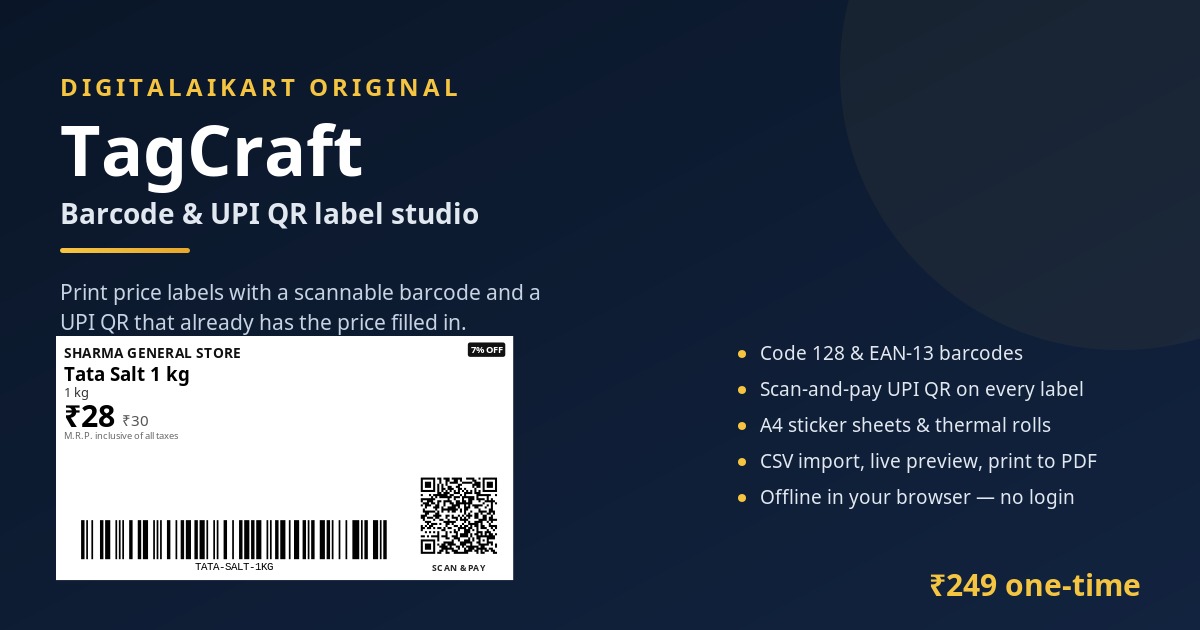
TagCraft turns your product list into printable price labels. Each label carries the product name, selling price, MRP, size, a real Code 128 or EAN-13 barcode, and a UPI QR code with the price already filled in, so a customer scans once and pays. Five sticker layouts are built in, from a 24-up A4 sheet to 50 x 25 mm thermal rolls. Type your products or import a CSV, watch the sheet update as you type, then print. The whole tool is a folder of plain HTML, CSS and JavaScript that runs offline in your browser — no account, no installation, no monthly fee, and nothing you type leaves your computer.
Get TagCraft — ₹249 →Price tags are the smallest job in a shop and the one that eats the most evenings
A price changes, the tag does not. Names are unreadable, sizes are missing, and the counter has to guess. A printed label takes seconds to redo.
Every item typed at the counter is a queue and a mistake. A scannable Code 128 label on the product makes billing a single beep.
Typing your UPI ID, asking for the amount, waiting for the screenshot. A QR with the amount already filled in ends the conversation.
Most label tools are priced per month or per year, tied to one computer, and stop working the day the plan lapses. This one is a folder you own.
Everything happens inside your browser — the barcodes are generated, not drawn
Code 128 and EAN-13 are encoded from the specification in plain JavaScript. No CDN, no barcode font, nothing to install.
Your UPI ID, your shop name and the label's price go into a standard upi://pay QR. Or print a QR with no amount, or any text you like.
24-up, 40-up and 14-up A4 sheets plus 50 x 25 mm and 38 x 25 mm thermal rolls, laid out in exact millimetres.
Type a price and the whole sheet redraws — name, MRP strikethrough, discount badge, barcode and QR.
Bring a product list from Excel, or export the list you built here. Commas inside product names are handled.
'Start at position' leaves the first slots blank, so a partly used sticker sheet is never wasted.
A code that cannot be encoded, a price of zero, a UPI ID that looks wrong — each problem is named by row instead of printing something unscannable.
A folder of HTML, CSS and JS. Open index.html, print, close it. Your product list saves in the browser automatically.
Sample labels from the tool, with a sample shop filled in — every barcode and QR below is a real encoding
Any shop that prices stock with a sticker and takes UPI at the counter
Hundreds of loose items, each needing a name, a price and a barcode for the counter scanner.
Counter labels and takeaway boxes with weight, price and a scan-and-pay QR.
Small 48 x 25 mm labels for shelves and drawers where a printed tag beats handwriting.
Product labels with a SKU barcode for your own stock counts, plus a payment QR for local delivery orders.
Shelf labels with size or specification lines, printed 14-up so the price is readable from a distance.
Rate cards and takeaway labels with a QR the customer can scan at the table.
Three steps, about five minutes the first time
Shop name and UPI ID. The UPI box tells you immediately whether the ID looks right, and the QR appears on every label.
Type rows, or import a CSV from Excel. Set how many copies of each label you need and which sticker sheet you have.
Set margins to None and scale to 100%, print, and stick. The labels come out at the exact millimetre size of your sheet.
One ZIP, everything inside, nothing to install
Double-click and it opens in your browser. Shop details, sheet choice, label design, product table and a live preview.
The barcode, QR and label engine — Code 128, EAN-13, QR versions 1 to 10, Indian number formatting and CSV parsing.
The interface and the print rules, including the exact page size for each layout.
Quick start, sheet size table, printing settings that matter, CSV format, UPI notes and a troubleshooting table.
A labelled example list you can import in one click.
The same example as a save file, to see how a finished project looks.
Plain-English terms: unlimited labels for your own shop, no reselling the files.
Plain, portable files — no lock-in and nothing that can be switched off
One ZIP containing HTML, CSS and JavaScript files, plus the instructions, sample files and the licence. Unzips on Windows, macOS, Linux and Android.
Current Chrome, Edge, Firefox and Safari on desktop and mobile. No plugin, no account, no internet connection needed after the download.
Any printer that handles A4, or a thermal label printer set to 50 × 25 mm or 38 × 25 mm. Printing goes through your normal print dialog, so “Save as PDF” works too.
Your product list stays in your browser and can be saved as a JSON file or exported to CSV. Nothing is uploaded to any server.
One-time payment · Lifetime access · No subscription, no watermark, no per-label limit
What happens after you pay
Your download is ready the second your payment succeeds — one ZIP with the tool, the instructions, the samples and the licence.
The tool runs on your own device. No account, no analytics, no external requests — your prices and your UPI ID never leave your computer.
UPI, cards, net banking & wallets — processed on PCI-DSS compliant infrastructure.
Everything you need to know before buying
No. You get a working label maker — an app you open in your browser — plus instructions, sample files and a licence. There is no book to read.
No. Everything runs from the folder on your own computer. There is no sign-up, no login, no server and no analytics, so you can switch off the internet and keep printing.
Code 128 and EAN-13 are generated to the published specifications, and every sample was decoded back with an independent barcode reader during testing. Whether a particular label scans depends on your printer, paper and scanner — print one test label and scan it before a full batch.
Code 128 by default: it holds letters, numbers and dashes, so your own SKU like TATA-SALT-1KG works. Use EAN-13 only if you have a real 13-digit number, for example from a supplier. EAN-13 accepts digits only and TagCraft calculates the check digit for you.
You enter your UPI ID once. TagCraft builds a standard upi://pay link with your ID, your shop name and the label's price, and prints it as a QR code. The customer scans it with any UPI app and pays you directly. The money never passes through TagCraft and no payment credentials are stored.
Five layouts: A4 with 24 labels (63.5 x 33.9 mm), A4 with 40 labels (48.3 x 25.4 mm), A4 with 14 labels (99 x 38.1 mm), a 50 x 25 mm roll and a 38 x 25 mm roll. Positions are exact for the standard A4 sticker sheets sold in India.
Yes. Set 'Start at position' to skip the labels you have already used; those slots print blank and the first product starts where you tell it to.
Yes. Import a CSV with the columns name, price, mrp, code, size, copies — the same file you already keep in Excel works. You can export the list back to CSV at any time, and save the whole project as a JSON file to move it to another computer.
No. TagCraft prints price and payment labels only. It does not create tax invoices or file returns — for invoices use a billing or GST tool.
Any current Chrome, Edge, Firefox or Safari on Windows, macOS, Linux or Android, with any printer that can print A4 or a label roll. Printing from a phone needs a printer app or a wireless printer.
After a successful payment on Razorpay you land on a thank-you page with a download button. The ZIP downloads immediately and the link stays usable — keep the email receipt.
Digital products are non-refundable once downloaded. If a file is missing, corrupted or will not open, email lonefaisal977@gmail.com within 7 days and it will be replaced.
If you are labelling stock, these cover the next steps
An Excel system for SKU stock, margin and reorder levels — the numbers behind your labels.
Offline invoicing for the bill you hand over after the barcode is scanned.
Ready-to-post graphics for the offers behind the price cut.
One-time ₹249 · Barcodes + UPI QR · A4 sheets and label rolls · Instructions & licence included.
Get TagCraft →