InboxKit India — 12 Responsive Email Templates for Indian Small Businesses
Twelve emails your customer will actually open, built to survive Gmail, Outlook and a phone
Most small businesses in India send their most important emails from a blank compose window or a free template that falls apart the moment it reaches Outlook. This is twelve complete HTML emails covering the jobs you actually send: order confirmation, dispatch and tracking, a GST tax invoice with the CGST and SGST split, a polite UPI payment reminder for a client who is late, a quotation follow-up, a festive sale, an appointment reminder, a cart recovery, a launch, a feedback request and a win-back. Each file is a table-based layout with inline CSS at 600px, one breakpoint at 600px, a button that is a real table cell rather than a CSS trick, and no images, web fonts, JavaScript or tracking pixels — so the email looks the same with images blocked, which is how most of your customers read it. Every example value is highlighted in pale yellow, every merge field is in a documented list, and the manual gives the exact upload path and merge-tag syntax for Mailchimp, Brevo, Zoho Campaigns, Klaviyo, MailerLite and HubSpot, plus Shopify and WooCommerce notification templates.
An email is not a web page. Outlook for Windows renders email with Microsoft Word's layout engine, Gmail strips most of a <style> block, and Apple Mail on a phone will quietly re-scale any text under 13px. A layout that looks perfect in a browser preview can arrive as a single narrow column of text with the button turned into a blue underlined link — and you only find out because a customer says the invoice looked strange.
The fix is not a better designer. It is a boring one: tables for layout, styles inline on the elements, 600 pixels wide, one media query for phones, and buttons built from a table cell with padding rather than a styled anchor. That is what all twelve files in this pack do. They are also deliberately image-free — no logo image, no hero banner, no web font — because images are blocked by default in many inboxes and a web font simply does not load in Outlook. What you lose in decoration you get back in the email looking the same everywhere, loading instantly, and never showing an empty box where a banner should be.
And the copy is written for the Indian context rather than translated into it: rupee amounts in Indian digit grouping, UPI and IFSC details on the payment reminder, a CGST and SGST split on the invoice with a commented-out IGST row for inter-state supply, and a plain-English tone that does not pretend a reminder is a friendly hello.
The Twelve Templates
Each one is a complete, self-contained .html file
01 · Welcome a subscriber
The email that sets the promise. States how often you will write, what arrives, and links to preferences — the three lines that stop a first unsubscribe.
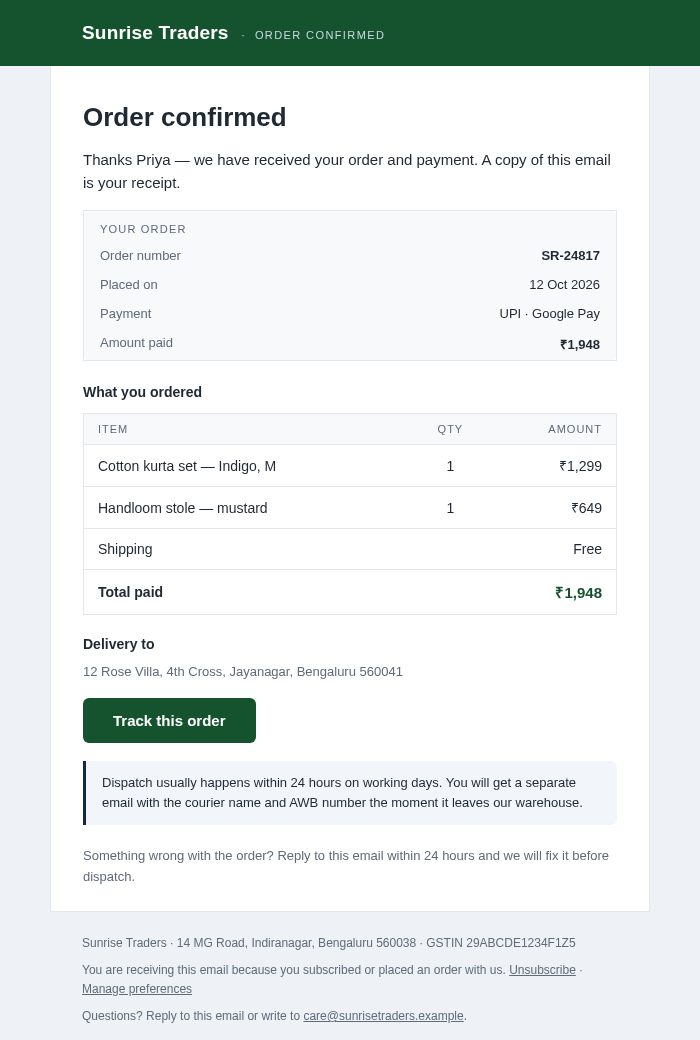
02 · Order confirmation
A receipt that reads like one: order number, date, payment method, an item table with quantities and a bold total, the delivery address, and a tracking button.
03 · Payment reminder (B2B)
Polite, specific and complete: invoice number, due date, days past due, amount, UPI ID, account number and IFSC, plus the "already paid? send the UTR" line that saves a phone call.
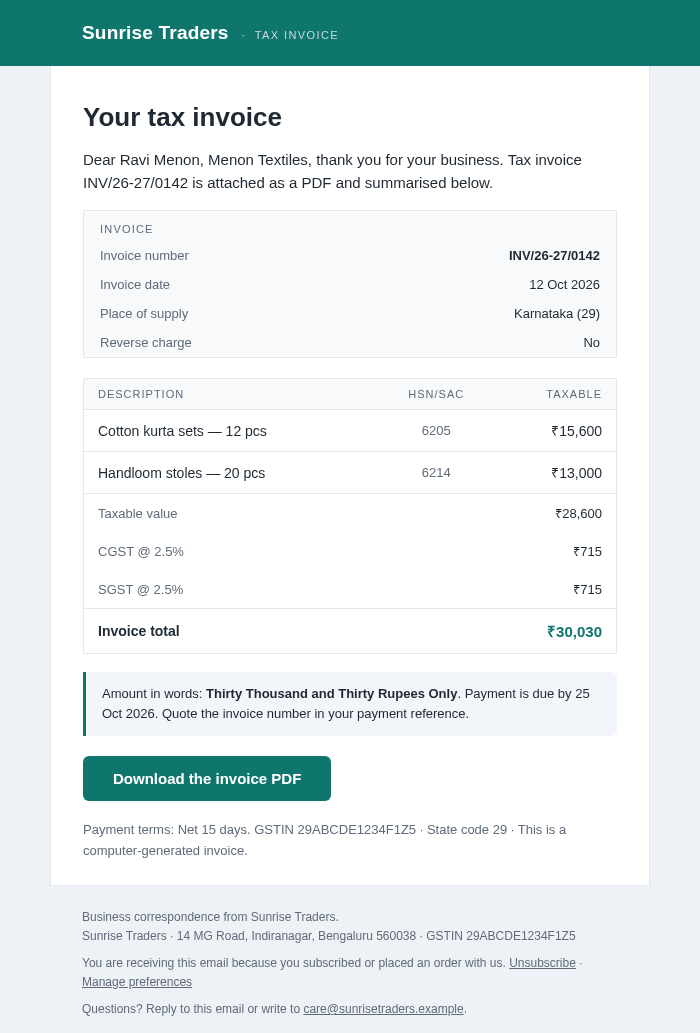
04 · GST tax invoice
Invoice number, date, place of supply, reverse charge, HSN, taxable value, CGST and SGST rows, total, and the amount in words. The IGST row for inter-state supply sits commented out in the file, ready to swap in.
05 · Quotation follow-up
A quote that has gone quiet. Restates the scope, the amount and the validity date, and gives an honest line for when the budget — not the scope — is the blocker.
06 · Abandoned cart
Cart contents, cart value, free-shipping threshold and return window. No invented coupon: the copy says plainly that a real discount runs twice a year.
07 · Dispatch & tracking
Courier, AWB number, dispatch date, expected delivery and a tracking button, plus what happens if nobody is home — written for how Indian couriers actually behave.
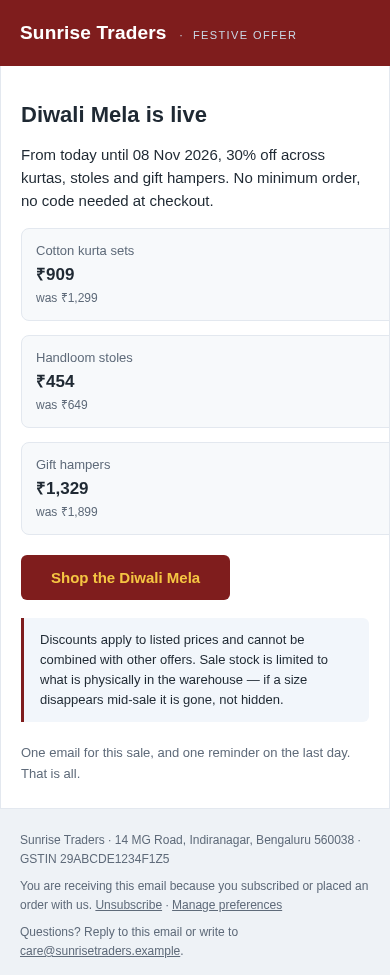
08 · Festive sale
Three price cards that stack on a phone, a sale end date, and one line about stock being real. Works for Diwali, Pongal, Onam, Eid or an end-of-season clear-out.
09 · New product launch
What it is, what it is made of, which sizes exist, the launch price and when it ends — then the subscriber early-access note, with no code needed.
10 · Feedback request
Two real questions instead of a star rating, and an explicit promise that no discount is offered in exchange for a review. The line most template packs leave out.
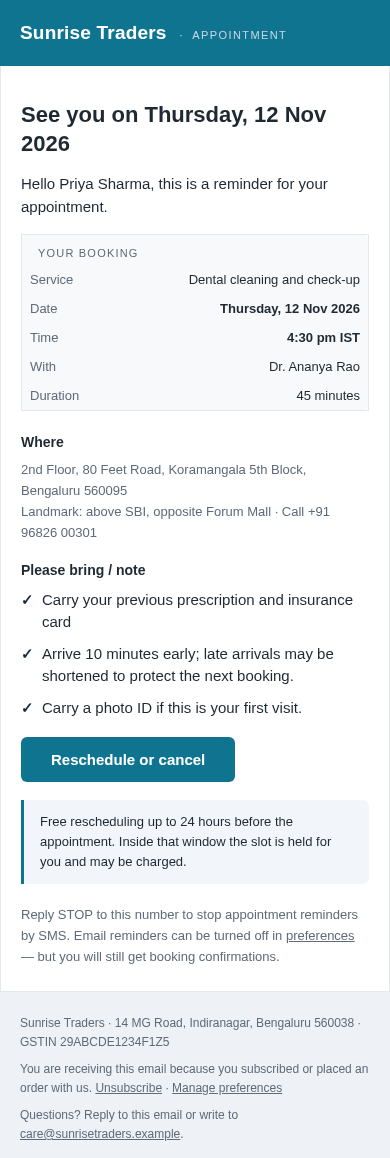
11 · Appointment reminder
For clinics, salons, studios and consultants: service, date, time, who they are seeing, duration, address, landmark, what to bring, and a reschedule button.
12 · Win-back
Three concrete changes since their last order, an honest offer to unsubscribe, and no discount code — because a discount is not a reason to come back.
A Look Inside
Rendered from the actual files, at desktop and phone width
Screenshots of the real template files with the example values filled in. The business "Sunrise Traders" is fictional; in the pack those values are highlighted in pale yellow so you can find and replace every one.
What You Get for ₹249
One ZIP, 19 files, nothing to subscribe to
Twelve templates
Twelve .html files in templates/, numbered in the order you will use them. Each is complete on its own — no shared CSS file, no build step, no dependency that can go missing.
A live gallery
preview.html renders all twelve in your browser, side by side with the subject line and preheader written for each. Not a screenshot — the real files, so what you see is what you will send.
The manual
GUIDE.html — nine sections: editing, which platform for which template, the full merge-field table, upload steps for six platforms, the pre-send check, deliverability, India-specific notes and a troubleshooting table.
The merge-field sheet
merge-fields.csv — all 69 fields with what each holds, an example value and which templates use it. Open it next to your platform's mapping screen.
Quick start
START-HERE.txt — the five-minute version on one page, including the one mistake that shows up in most first sends.
Licence
LICENSE.txt — eight clauses: unlimited emails, unlimited edits, your business plus one client, no resale. Plainly written, not 4,000 words of legal padding.
Built for Indian Inboxes
The details a foreign template pack gets wrong
Rupee symbol that survives Outlook
Amounts use the HTML entity ₹ rather than the raw ₹ character, which some older Outlook builds mangle into a question mark. Numbers follow Indian digit grouping — ₹1,45,000, not ₹145,000.
A payment reminder with UPI on it
UPI ID, account name, account number, IFSC, days past due and the "quote the invoice number in the reference" line — the four things a client's accounts person needs before they will release a payment.
A GST invoice layout, honestly labelled
Place of supply, reverse charge, HSN, taxable value, CGST and SGST split, amount in words, and a commented-out IGST row for inter-state supply. The rates shown are examples — the guide says so twice, and says your accountant's word beats any template's.
Consent and unsubscribe, kept separate
The guide splits marketing templates from transactional ones, so an invoice reminder never stops because someone unsubscribed from your offers — and every marketing template keeps a working unsubscribe and preference link.
Courier reality
The dispatch template says two delivery attempts are made, that the courier sends an SMS on the day, and that North-East, Jammu & Kashmir, Andaman and Lakshadweep pin codes take longer. Estimates, described as estimates.
No fake urgency anywhere
No invented countdowns, no "only 2 left" unless it is true, no coupon in the cart-recovery email, and a feedback template that promises no discount in exchange for a review.
Who It Is For
If you send the same email more than twice a month, this pays for itself
🛍️
D2C brands and online sellers
Order confirmation, dispatch and tracking, cart recovery, festive sale and win-back — the five emails that decide whether a first order becomes a second one.
🏥
Clinics, salons and studios
The appointment reminder with address, landmark, what to bring and a reschedule button. Fewer no-shows, fewer phone calls to the front desk.
🧾
Freelancers and consultants
Quotation follow-up, GST invoice and payment reminder — the three emails where a sloppy layout costs you actual money, because it looks like the work is sloppy too.
🏢
Agencies and freelancers serving clients
One licence covers your business plus one client's. Ship a client's email sequence in an afternoon instead of starting from a blank table.
📊
Accountants and virtual CFOs
Send a tax invoice and a payment reminder that a client's accounts team can read on a phone without squinting at a PDF attachment.
🎓
Coaching classes and institutes
Fee reminders, batch launch announcements, a festive offer on a new batch and an appointment reminder for a demo class.
How It Works
Open, replace, test, send — about five minutes for the first one
Pick and open. Start with preview.html, choose the email that matches the job, then open that file in a plain text editor — VS Code, Notepad++, Sublime, even Notepad. Not Word and not Google Docs: both rewrite the HTML and quietly break the layout.
Replace the highlighted values. Every example value from the fictional business carries a pale-yellow highlight. Search for class="ph" and work down the file. When you are done, remove the class — or leave it, and the highlight will remind you at a glance what is still a placeholder.
Map the merge fields. Anything in double curly braces is filled by your email platform. All 69 are listed in merge-fields.csv with an example. If your platform uses different syntax — Mailchimp wants *|FNAME|*, Zoho wants $[FNAME]$ — find-and-replace across the file, and the guide gives the exact syntax for six platforms.
Test before you send. Send it to yourself on Gmail and on an Outlook.com address, and check it at 390px in your browser's device toolbar. Click every link. Read the preheader. Check the amount and the date twice — in an invoice or a payment reminder, a wrong number is worse than a plain design.
Keep two pipes. Marketing templates go to your list; invoices, payment reminders and appointment reminders go out as transactional email, so an unsubscribe never blocks a bill. Section 2 of the guide maps all twelve.
File Format & Compatibility
Plain .html, no lock-in, no build step
Format
One ZIP containing twelve .html files, a gallery, a manual, a CSV, a quick start and a licence. Unzips on Windows, macOS, Linux, Android and iOS with the built-in tools.
Edit with
Any text editor — VS Code, Sublime, Notepad++, Notepad, TextEdit in plain-text mode. No design software, no Node, no build step, nothing to install.
Send with
Mailchimp, Brevo, Zoho Campaigns, Klaviyo, MailerLite, HubSpot, SendGrid, Amazon SES, Postmark, or the notification templates in Shopify and WooCommerce. Any platform that accepts custom HTML.
Built for
Gmail (web and app), Outlook for Windows and Outlook.com, Apple Mail on iPhone and Mac, and the default Android mail clients. Table layout and inline CSS are the techniques that survive all of them; test in your own before a real send.
No dependencies
No images to host, no web fonts, no JavaScript, no tracking pixels, no external stylesheet. The largest template is about 13 KB, well under the point where Gmail starts clipping.
What it is not
Not an email platform, not a copywriting service, not a deliverability guarantee, and not legal, tax or GST advice. The invoice is a layout; the rates and wording are yours and your accountant's.
Licence
One purchase, your business plus one client, forever
Your purchase covers your own business and, if you are a freelancer or agency, one client's business, with unlimited emails and unlimited edits, for as long as you like. You may change the copy, the colours, the layout and the merge fields, host the finished emails on your own domain and hand them to your developer. You may not resell, redistribute or republish the files, upload them to a marketplace or a file-sharing site, or bundle them into another product, a course, a membership or a SaaS. If you run campaigns for several clients, one licence per client business — write to us for a multi-client price. Full terms are in LICENSE.txt inside the ZIP.
Get Instant Access
One-time payment · Lifetime access · No subscription
LAUNCH PRICE
InboxKit India — 12 Responsive Email Templates
₹249
₹999 · launch price for the first buyers
Twelve complete HTML email templates, one file each
Order confirmation, dispatch and tracking, cart recovery
GST tax invoice with CGST / SGST split and a commented IGST row
B2B payment reminder with UPI ID, account number and IFSC
Your download is ready the second your payment succeeds — one ZIP with all twelve templates, the gallery, the manual, the merge-field sheet and the licence.
🔓
Nothing Locked
Plain, readable, unminified HTML. No licence key, no expiry, no phone-home, no locked sections. Every line is yours to change.
🧾
No Subscription
One payment of ₹249. No renewal, no per-seat fee, no per-email charge, no "pro" tier waiting behind it.
🛠️
Real Support
If a template breaks after you edit it, email us with the file name and the line — one reply usually settles it. We do not promise inbox placement and we will not pretend to.
Frequently Asked Questions
Is this an ebook or actual files?
Actual files. The ZIP contains twelve complete .html email templates, a live gallery, a full guide, a merge-field sheet in CSV, a quick start and a licence. You edit the HTML in a text editor and paste it into your email platform.
Do I need to know HTML?
You need to be able to find text in a file and replace it — that is the whole skill. Every value you should change is highlighted in pale yellow, and every merge field is written in double curly braces and listed in merge-fields.csv. If you want to change colours or add a logo, the guide gives the exact lines.
Which email platforms do these work with?
Any platform that accepts custom HTML: Mailchimp, Brevo, Zoho Campaigns, Klaviyo, MailerLite, HubSpot, SendGrid, Amazon SES, Postmark, and the notification templates in Shopify and WooCommerce. The guide gives the exact menu path and the merge-tag syntax for each of the six main ones.
Do the templates use images?
No. There are no images, no web fonts, no JavaScript and no tracking pixels in any of the twelve. Every visual is a coloured block or system-font text, so the email looks the same with images blocked — which is how most people read email on a phone. It also means nothing to host and nothing to go missing.
Will it look right in Outlook?
Outlook for Windows renders with Word's engine, which is exactly why these use a table layout with inline CSS instead of flexbox or grid — that is the technique that survives it, and the buttons are table cells with a padded anchor rather than CSS-only buttons. No template can be guaranteed in every client version, so send yourself a test in Gmail and Outlook before a real send; the guide has a six-point pre-send check.
Is the GST invoice template legally complete?
It is a layout, not legal advice. It carries the fields a tax invoice usually needs — invoice number, date, place of supply, reverse charge, HSN, taxable value, the CGST and SGST split, total and the amount in words — with a commented-out IGST row for inter-state supply. The rates and HSN codes shown are examples for readymade garments. Your rates, your wording and your accountant's sign-off are your responsibility.
Can I change the colours to my brand?
Yes. Each file names its accent colour in a comment at the top and uses it in two places: the header band and the button. Replace both hex codes and the whole email follows. Nothing is minified, so a find-and-replace is enough.
Can I use these for client work?
Yes — the licence covers your own business plus one client's business. If you run campaigns for several clients, buy one licence per client business, or write to us for a multi-client licence.
Can I resell the templates?
No. You can send unlimited emails with them and edit them however you like, but the files themselves cannot be resold, redistributed, uploaded to a marketplace or bundled into another product, a course or a SaaS. The licence is eight short clauses.
Do these guarantee my email reaches the inbox?
No, and nothing else does either. Inbox placement depends on your sending domain, SPF, DKIM and DMARC records, a warmed domain and a list that opted in. The guide says this plainly and lists what to set up rather than promising a placement.
How do I get the files after payment?
After a successful payment on Razorpay you are sent straight to a thank-you page with a download button. Click it and the ZIP is yours immediately. There is no account to create and no email to wait for.
Can I get a refund?
Digital files are non-refundable once downloaded. But if a file arrives corrupted or will not open, or you were charged incorrectly, email lonefaisal977@gmail.com within 7 days and it will be replaced or resolved.
Pairs Well With
Other Digitalaikart products that sit alongside these emails