An ATS-ready resume and matching cover letter — built offline, in your browser
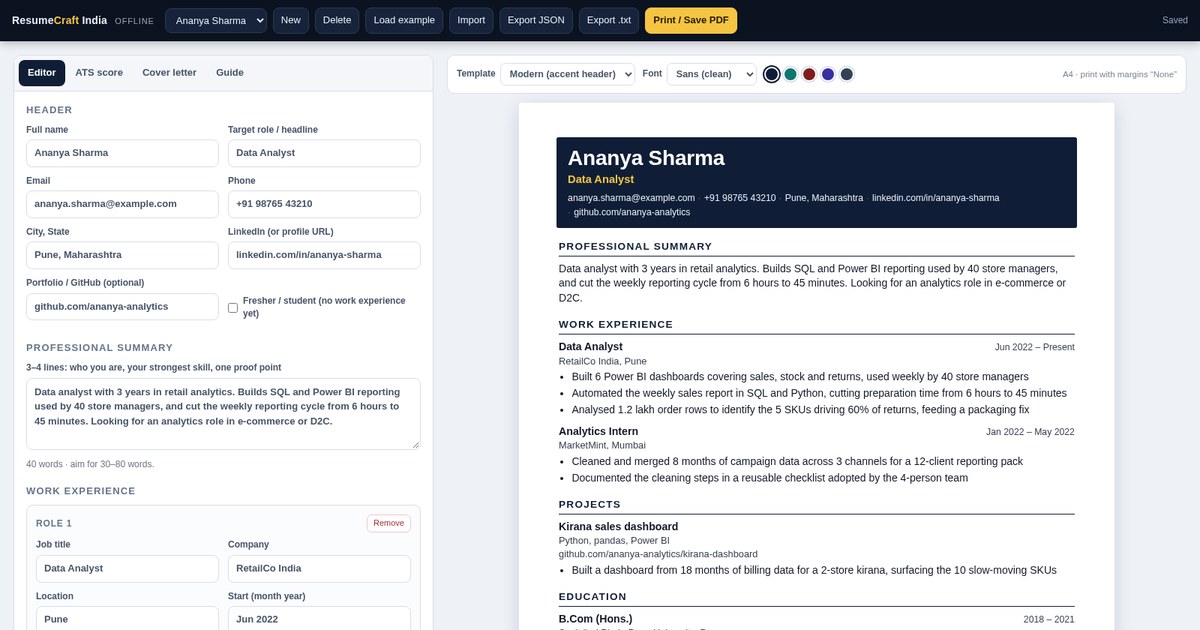
One small HTML file that turns your details into a clean, parser-safe resume. Type on the left, watch the A4 page build on the right, and get a 0–100 readiness score that tells you exactly what to fix — vague bullets, missing numbers, a summary that is too long. Paste the job description you are applying to and it shows which of its key terms your resume is missing. Then generate a cover letter from the same content and print both to PDF. No sign-up, no watermark, no subscription, nothing uploaded.
Get the Tool — ₹199 →A good resume is not a design problem — it is a wording problem, and most tools only sell you the design
Most resumes list duties because that is what the job description said. The fix is mechanical: start with a verb, end with a number. The score pushes you to do it bullet by bullet.
The job post says “stakeholder management” and “SQL”; your resume says “dealing with people” and “databases”. Both can be true, but only one gets parsed as a match.
Tables for the layout, a text box for the contact details, a photo in the corner — every one of those is a parsing risk, and moving one line breaks the page.
You need a resume for a fortnight of applications, not another ₹299 a month. This is one file, one payment, unlimited resumes, no watermark.
“Quantify your impact” is useless when your last job was an internship. Fresher mode scores projects, and the bundled checklist shows how to write a project bullet with numbers you actually have.
There is no feedback loop in a job application. A checklist you run before sending is the closest thing to one — and it takes two minutes.
Anyone applying for a job in India who is tired of fighting a word processor
No work history yet. Fresher mode scores your projects instead of jobs, and the checklist shows how to write a project bullet that carries weight.
Naukri, LinkedIn, company career pages and the ATS behind them. You get a single-column, selectable-text PDF and the keywords the post actually asks for.
A career-switch cover-letter tone, and a score that pushes you to reframe old bullets around the skills the new role needs.
Help students produce a decent first resume without a paid subscription, on a college computer with no internet.
The whole resume job, in one file
Name, summary, roles, education, skills, projects, certifications, achievements and languages. Add a second job or degree with one click; the A4 preview updates as you type.
A 0–100 readiness score across ten weighted checks, each with the points earned and a plain-language fix — “start every bullet with a verb”, “add a number to three bullets”.
Paste the job post. The tool pulls its key terms, shows which ones your resume already contains and which are missing, so you can mirror the wording where it is honestly true.
Classic ATS, Modern with a coloured header band, and Compact for dense resumes. Two font families and five accent colours. All single column, all parser-safe.
Builds a four-paragraph letter from your own resume: the role, your strongest quantified result, and the skills you would bring. Standard, fresher and career-switch tones. Editable, copyable, printable.
Export the whole resume as JSON and import it on another computer. Export a plain-text version for portals that ask you to paste your resume instead of uploading a file.
Ten weighted checks, each with the points earned and a specific fix — no black box
All three present in the body of page one. Without them the parser cannot create a candidate record at all.
A headline under your name so the resume is filed under the role you actually want.
Full marks at 30–80 words. Shorter reads thin; longer gets skipped.
Two roles with title and company score full marks; a fresher's two projects score six.
Degree, institute, years and score or CGPA.
Six or more items, in the words the job post uses.
The heaviest single check: how many bullets open with a verb instead of “Responsible for”.
Four quantified bullets score full marks; three score ten. Percentages, rupees, hours saved, team size, counts.
250–850 words — the range that fits one to two pages without padding.
Added when you paste a job post: how many of its top terms appear in your resume. The missing ones are listed so you can add the ones that are true.
A complete, self-contained folder — nothing else to buy
The entire app in one file: editor, live A4 preview, ATS score, keyword match, cover-letter generator and print layout. Double-click to run.
Quick start in two minutes, the print settings that produce a clean PDF, how your data is stored, and fixes for the usual problems.
Import it to see a finished resume, an ATS score of 93 and a generated cover letter before you type a single word of your own.
A 12-point pre-send checklist, 120 action verbs grouped by what they claim, four bullet formulas that work, and the words to delete.
Single-user licence. Unlimited resumes and PDFs, commercial use of the documents you create, no resale or redistribution of the tool itself.
From download to a sent application in about fifteen minutes
Unzip the folder and double-click index.html. It opens in Chrome, Edge, Firefox or Safari — no installer, no admin rights.
Work down the form. One bullet per line in each role. The resume is saved in your browser as you type, so you can close the tab and come back.
Open the ATS tab and clear the red items, then the amber ones. Paste the job description to see the keywords you are missing.
Print / Save PDF with A4 paper and margins set to None. Save as Firstname-Lastname-Role.pdf, attach the cover letter, and apply.
The editor, the score and the page it prints
A form with repeaters for roles, degrees, projects and certifications. The right side is a true A4 sheet at 210 mm, so what you see is what prints.
Every check is a rule you can act on, with the points earned shown beside it. The ring turns amber and red as items are missed, so the next fix is obvious.
Single column, standard headings, real selectable text, no tables, no text boxes, no photo. Contact details in the body of page one where parsers actually look.
Plain, portable files — no lock-in
One ZIP with a single HTML file (HTML, CSS and JavaScript in one document), a README, an example JSON resume, a printable checklist and the licence. Unzips on Windows, macOS, Linux and Android.
Current Chrome, Edge, Firefox and Safari. Printing to PDF is most reliable on desktop. Nothing else is required — no Office, no internet, no account.
Print to paper or save as PDF from your browser's print dialog. Export JSON for backup and import it back anywhere. Export .txt for portals that want pasted text.
One-time payment · Lifetime access · No subscription
Your purchase is protected
Your download is ready the second your payment succeeds — a single ZIP with the builder, instructions, example data and licence.
Nothing is uploaded. Your resume is stored in your own browser on your own device, and the app makes no network calls at all.
UPI, cards, net banking & wallets — processed on PCI-DSS compliant infrastructure.
Everything you need to know before buying
It is a tool, not an ebook. You get a ZIP containing one index.html file — the builder — plus a README, an example resume, a printable ATS checklist and your licence. Double-click index.html and the builder opens in your browser. Nothing to install, no account to create.
Yes. The file has no server, no analytics and no network calls. Switch the internet off and it still builds resumes, scores them, generates cover letters and prints PDFs. Your data is saved in your own browser's local storage on your device.
Nine checks: contact details, a target role line, summary length, work experience or projects, education, a skills section with six or more items, bullets that start with action verbs, bullets that contain numbers, and overall length. Paste a job description and a tenth check is added: how many of that post's key terms appear in your resume. Each check shows the points earned and a specific fix.
No, and no tool can honestly promise that — applicant tracking systems differ. What this does is keep you inside the rules parsers handle reliably (single column, standard headings, selectable text, no tables or images) and show you the gaps in your content. The rest is your experience and how you describe it.
Yes. Turn on Fresher / student mode and the score weights projects instead of jobs. The cover-letter generator has a fresher tone, and the bundled checklist explains how to write project bullets when you have no job history.
Click Print / Save PDF, then choose Save as PDF in your browser's print dialog with A4 paper, margins set to None, scale 100% and "Headers and footers" switched off. The app prints only the resume, never the editing interface.
The editor works in mobile browsers, but the print-to-PDF step is best done on a laptop or desktop. Most people fill the resume on a laptop and keep the JSON backup in Drive to open on another machine.
No. One-time ₹199. No monthly fee, no per-download charge, no watermark, and no limit on how many resumes you create.
After a successful payment on Razorpay you are taken to a thank-you page with a download button. Click it to get your ZIP instantly — it is yours to keep.
Digital products are non-refundable because they are instantly downloadable. But if you receive a defective or corrupted file, or were charged incorrectly, we will replace or resolve it — just email lonefaisal977@gmail.com within 7 days.
Once the resume is ready, these Digitalaikart guides help with the next step
Aptitude rounds, group discussions and interviews for final-year students — the part after the resume.
Using AI to find openings, tailor applications and prepare for interviews without sounding generic.
Profile and outreach scripts that keep you visible while you apply — useful for referrals too.
One-time ₹199 · Offline tool · Instructions, example resume, checklist & licence included.
Get the Tool →