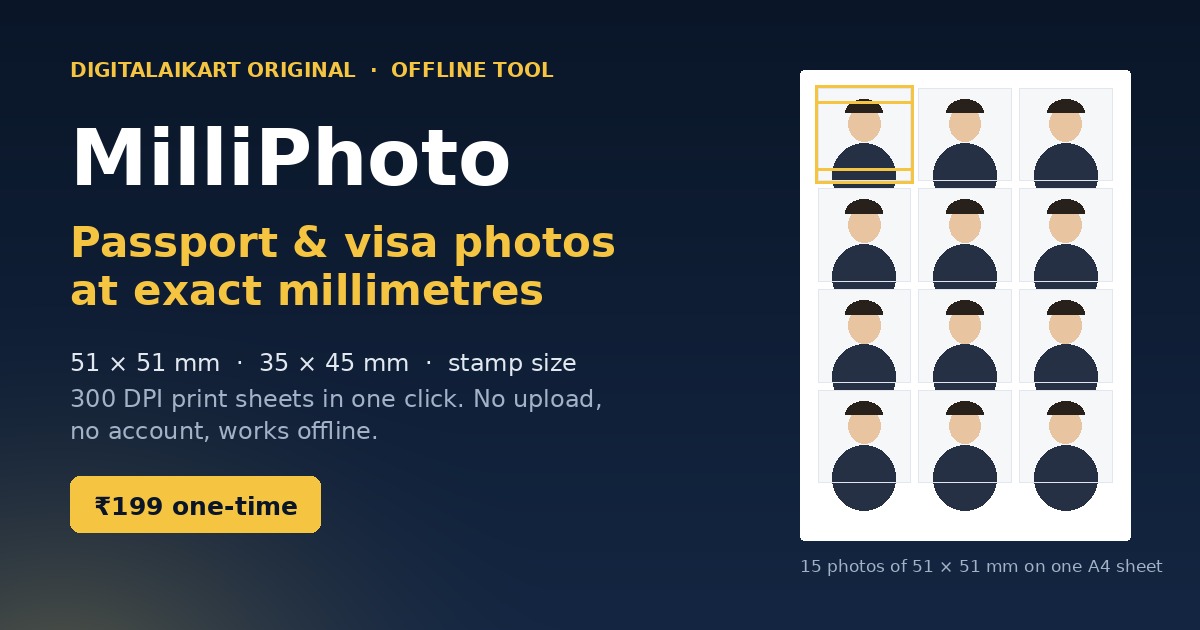
MilliPhoto — a printed A4 sheet of fifteen passport-size photos with head-height guides
Digitalaikart Original · Offline Photo Tool

MilliPhoto

Passport and visa photos at the exact millimetre — from one photo, on your own printer

MilliPhoto takes one photograph and lays it out as a print-ready sheet of passport, visa or stamp-size photos. Every size is built to the millimetre the form asks for and rendered at 300 DPI: Indian passport 51 × 51 mm, the everyday 35 × 45 mm used by PAN, Aadhaar, exam and job forms, stamp size 20 × 25 mm, US visa, Schengen, UK and Canada. The crop editor draws the head-height band, the chin line and the eye line over your photo, so you can see whether the head is the right size before anything is printed. Choose A4, A5 or 4 × 6 photo paper, print at 100% with no margins, and cut. For an online form, export a single JPG at its exact pixel size with a live KB read-out. It is a folder of plain HTML, CSS and JavaScript that runs in your browser — no upload, no account, no monthly fee, and your photograph never leaves your device.

8
Size presets
300
DPI output
5
Paper sizes
₹0
Per month
Get MilliPhoto — ₹199 →

The Problem It Solves

Six photos cost ₹80 to ₹350 at a studio, and the queue is the easy part

📐

Every form wants a different size

51 × 51 mm for a passport, 35 × 45 mm for PAN and exam forms, 20 × 25 mm for a school record. One wrong millimetre and the form comes back.

🖨️

Printing software scales the page

“Fit to page” turns 35 mm into 33 mm silently. A ruler on the first sheet is the only way to know, and most people find out at the counter.

🌙

The studio is shut when you need it

Forms are filled at night and deadlines arrive on Monday. A photo you already have, a printer down the road, and ten spare minutes are enough.

🔒

Free online tools want your face

Most “passport photo maker” sites upload your picture to a server, add a watermark, or charge per download. This one runs from a folder you own.

What MilliPhoto Does

Everything happens inside your browser — the sheet you see is the sheet that prints

📏 Eight sizes, to the millimetre

Indian passport 51 × 51 mm, PAN / Aadhaar / exam forms 35 × 45 mm, stamp size 20 × 25 mm, US visa, Schengen, UK and Canada, plus a custom size where you type the millimetres.

🎯 Head-height guides

A gold band marks the chin-to-crown height the size requires, with the chin line and the eye line drawn over your photo, and a 1.5 mm keep-clear edge.

🖨️ Print at exact size

The print page is set to the paper size with zero margins, so 35 mm prints as 35 mm. A4, A5, 4 × 6, 5 × 7 and US Letter.

🧮 The sheet maths is done for you

It works out how many photos fit, centres the grid, and lets you print a fixed number — eight copies for one application, or a full page of thirty.

🖼️ Single photo for online forms

Export one photo at its exact pixel size as a JPG, with a quality slider and a live file-size read-out so you can meet a portal's KB limit.

💡 Background and resolution checks

It samples the edges of your photo and says whether the background looks bright and even, and warns before a crop is too small to print sharply.

✂️ Light cut lines

A 0.15 mm grey outline around each photo, so a stack of thirty can be cut straight. Switch it off for a clean sheet.

🔌 Works offline

A folder of HTML, CSS and JS. Open it, work, close it. No account, no server, no analytics, nothing uploaded — and it still works in ten years.

A Look at the Sheet

The layout the tool produces for 51 × 51 mm photos on A4 — three columns, five rows, gold guides on the first cell

A4 · 15 photos of 51 × 51 mm
15 photos of 51 × 51 mm on one A4 sheet, with the head-height band marked

What the guides mean

The band is the chin-to-crown head height the chosen size requires — 25–35 mm for a US visa, 32–36 mm for a Schengen photo. The two gold lines are where the top of the head and the chin should land. The dashed line is the approximate eye level. The dashed border is a 1.5 mm keep-clear edge so the head never touches the trim.

Guides are drawn on screen only. They never appear on the printed sheet or in the exported photo, and you can switch them off.

SpecificationSizePixels at 300 DPI
Indian passport (Passport Seva)51 × 51 mm602 × 602
PAN, Aadhaar, exam & job forms35 × 45 mm413 × 531
Stamp size20 × 25 mm236 × 295
US visa / US passport51 × 51 mm602 × 602
Schengen, UK, Canada35 × 45 mm413 × 531
Customany mm you typecalculated

How It Works

Five steps, about five minutes, no account anywhere

  1. Open index.html. Unzip the folder and double-click the file. It opens in Chrome, Edge, Firefox or Safari — nothing to install.
  2. Add one photograph. Drop a file, choose one, or paste with Ctrl+V. The tool reports on the background and the resolution straight away.
  3. Pick the size the form asks for, then drag and zoom until the chin and the top of the head sit on the gold lines.
  4. Choose the paper and how many copies. The preview on the right is the exact page that will print.
  5. Print at 100%, or download the sheet as a PNG, or export a single JPG for an online form.

Who It's For

Anyone whose form wants a photograph of a particular size

🛂

Passport and visa applicants

Passport Seva, US DS-160, Schengen, UK and Canada — each with its own head height, from one sitting.

🎓

Students and exam candidates

SSC, UPSC, state exams, NEET, university admission forms — all of them ask for 35 × 45 mm or stamp size.

🏪

Cyber cafés and print shops

Make a customer's sheet in two minutes at the counter, for any size they bring in, without buying studio software.

🏢

Offices, schools and coaching centres

ID cards, admission files and staff records in one consistent size, printed in batches on ordinary A4.

👨‍👩‍👧

Families

Four people, four sets of photos, one afternoon — the same tool, the same printer, no repeat trips.

🧑‍💻

Freelancers and job hunters

A clean photo file at the right pixel size for a portal, and paper copies for the interview file.

What's Included

One ZIP, everything inside, nothing to install

index.html — the tool

Double-click and it opens in your browser: photo, size, crop, sheet, exports and print.

assets/specs.js

The size presets, the sheet maths and the crop geometry — every preset with the rule it comes from and the background it asks for.

assets/app.js and app.css

The interface, the guide drawing, the 300 DPI renderer and the print rules.

README.html — full instructions

Quick start, the complete size table, the printing settings that keep the size exact, how the guides work, and a troubleshooting table.

START-HERE.txt

Four lines on a plain text file, for the day you unzip it and forget what is inside.

LICENSE.txt

Plain-English terms: unlimited use for you, your family and your business, including at a shop counter. No reselling the files.

File Format & Compatibility

Plain, portable files — no lock-in and nothing that can be switched off

Format

One ZIP of about 25 KB containing HTML, CSS and JavaScript, plus the instructions and the licence. Unzips on Windows, macOS, Linux and Android.

Browsers

Current Chrome, Edge, Firefox and Safari on desktop, and the same browsers on Android and iOS. No plugin, no install, no internet connection needed.

Printing

Any inkjet or laser printer that handles A4, A5, 4 × 6, 5 × 7 or Letter. Printing goes through the normal print dialog, so “Save as PDF” works too.

Your data

The photograph is read from your own disk into the browser tab. Nothing is uploaded, stored on a server or sent anywhere, and closing the tab clears it.

Get Instant Access

One-time payment · Lifetime access · No subscription, no watermark, no per-photo limit

Buy With Confidence

What happens after you pay

⚡

Instant Delivery

Your download is ready the second your payment succeeds — one ZIP with the tool, the instructions and the licence.

🔒

Your Photo Stays Yours

Nothing is uploaded. The tool runs on your own device, so your face never passes through a server.

💳

Secure Razorpay Checkout

UPI, cards, net banking & wallets — processed on PCI-DSS compliant infrastructure.

Frequently Asked Questions

Everything you need to know before buying

Is this an ebook?

No. You get a working tool — a folder of HTML, CSS and JavaScript you open in your browser — plus instructions and a licence. There is no book to read.

Do I need internet or an account?

No. The tool runs entirely from the folder on your own computer or phone. There is no sign-up, no login, no server and no analytics, so your photograph is never uploaded anywhere.

Which photo sizes are built in?

Eight presets: Indian passport 51 × 51 mm, the everyday 35 × 45 mm used by PAN, Aadhaar, exam and job forms, stamp size 20 × 25 mm, US visa 51 × 51 mm, Schengen 35 × 45 mm, UK 35 × 45 mm, Canada 35 × 45 mm, and a custom size where you type the millimetres yourself.

Will the passport office accept the photo?

The tool prints the size and head height that the issuing authority publishes, and it measures your background and resolution before you print. It cannot promise acceptance — that depends on the photograph itself, the light, your pose and the officer in front of you. Check the current rule on the form you are filling in.

Does it remove or change my background?

No. It does not cut out the background and it does not retouch the face, because most authorities prohibit altering facial features. Shoot against a plain, evenly lit wall instead — the tool tells you whether the corners of your photo look bright and even enough.

My printed photo came out the wrong size. What went wrong?

Almost always the printer scaled the page. In the print dialog set Margins to None and Scale to 100%, and switch off “Fit to page” or “Shrink oversized pages”. Print one sheet and measure a photo with a ruler before printing a stack.

Does it work on a phone?

Yes. The interface works in mobile Chrome, Safari and Firefox, and the sheet can be downloaded as a PNG to print elsewhere. Printing from a phone needs a printer app or a wireless printer, so most people export the PNG and print it from a computer or a shop.

Can I make a JPG for an online form?

Yes. “Download one photo (JPG)” exports exactly one photo at its pixel size, with a quality slider and a live file-size read-out, so you can get under a portal's KB limit. Most Indian portals accept 20 KB to 200 KB.

Which paper sizes can I print on?

A4, A5, 4 × 6 inch photo paper, 5 × 7 inch photo paper and US Letter, each with adjustable margin and gap. On A4 with a 6 mm margin you get 15 photos of 51 × 51 mm or 30 photos of 35 × 45 mm.

Can I use it in my shop or cyber cafe?

Yes. The licence covers unlimited use for yourself, your family and your business, including a print shop or cyber cafe where you operate the tool for customers. You may not resell or redistribute the files themselves.

How do I get the files after payment?

After a successful payment you land on a thank-you page with a download button for the ZIP. The ZIP holds the tool, the instructions, a quick-start note and the licence.

Can I get a refund?

Digital products are non-refundable once downloaded. If a file is missing, corrupted or will not open, email lonefaisal977@gmail.com within 7 days and it will be replaced.
Pairs Well With

Once the photo is printed, these cover the paperwork behind it

The Indian Passport & Visa Playbook 2026-27

Appointments, documents, police verification and the errors that send an application back.

The US Visa & Immigration Playbook 2026-27

DS-160, the interview and the photo rules the consulate actually applies.

The Study in Germany Playbook 2027

Blocked account, APS, visa slot and the biometric photo a German mission expects.

Browse all Digitalaikart products →

Print Your Photos Tonight

One-time ₹199 · Eight sizes · 300 DPI sheets · Instructions & licence included.

Get MilliPhoto →